> ## Documentation Index
> Fetch the complete documentation index at: https://docs.coingecko.com/llms.txt
> Use this file to discover all available pages before exploring further.
# AWS Kiro
> Connect CoinGecko to Kiro — MCP server, SKILL, and steering rules in one place
[Kiro](https://kiro.dev/) is an IDE and coding agent from AWS. The integrations below are complementary — use any combination.
## Setup
Gives Kiro built-in knowledge of the CoinGecko API — writes correct requests without manual prompting.
Clone the repo into your working directory:
```bash theme={null}
git clone https://github.com/coingecko/skills.git
```
Then add the skill in Kiro by pointing to the cloned file path:
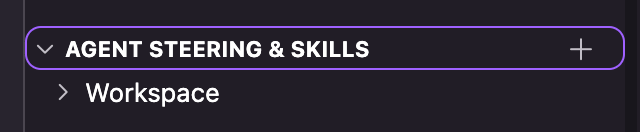
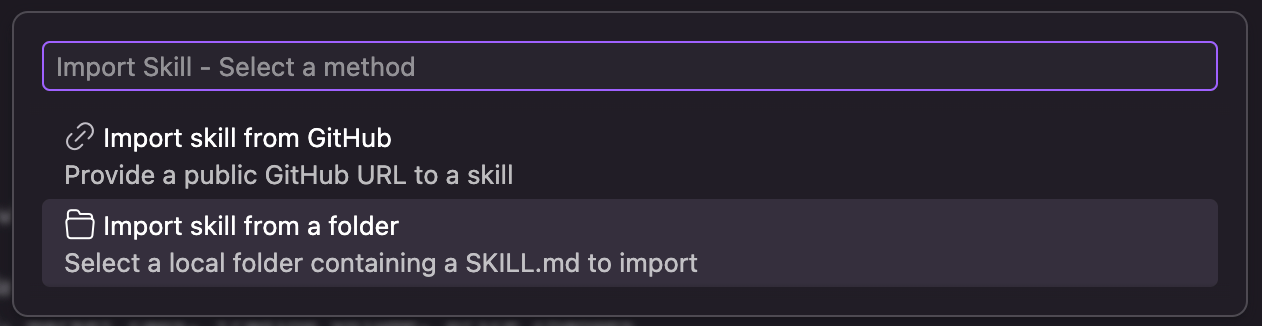 > Full details: [Agent SKILL](/ai-integration/agent-skill)
Connects Kiro to live CoinGecko data — prices, market caps, onchain pools, OHLCV, NFTs, and more.
Open the MCP settings in Kiro:
> Full details: [Agent SKILL](/ai-integration/agent-skill)
Connects Kiro to live CoinGecko data — prices, market caps, onchain pools, OHLCV, NFTs, and more.
Open the MCP settings in Kiro:
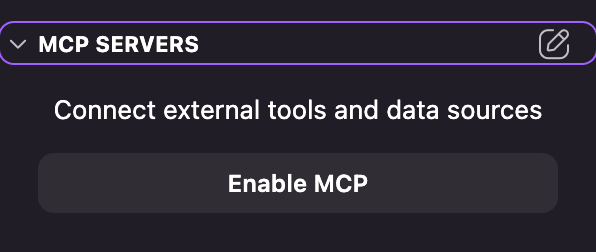 Add the CoinGecko MCP to your config:
```json Free (Keyless) theme={null}
"coingecko": {
"url": "https://mcp.api.coingecko.com/mcp",
"disabled": false
}
```
```json Use your API key theme={null}
"coingecko": {
"url": "https://mcp.pro-api.coingecko.com/mcp",
"disabled": false
}
```
> Full details: [CoinGecko MCP](/ai-integration/mcp-server)
Lets Kiro search CoinGecko documentation directly — endpoint references, guides, and tutorials.
Add to the same MCP config:
```json theme={null}
"coingecko-docs": {
"url": "https://docs.coingecko.com/mcp",
"disabled": false
}
```
> Full details: [Docs MCP](/ai-integration/docs-mcp)
## SDK Prompts (Steering)
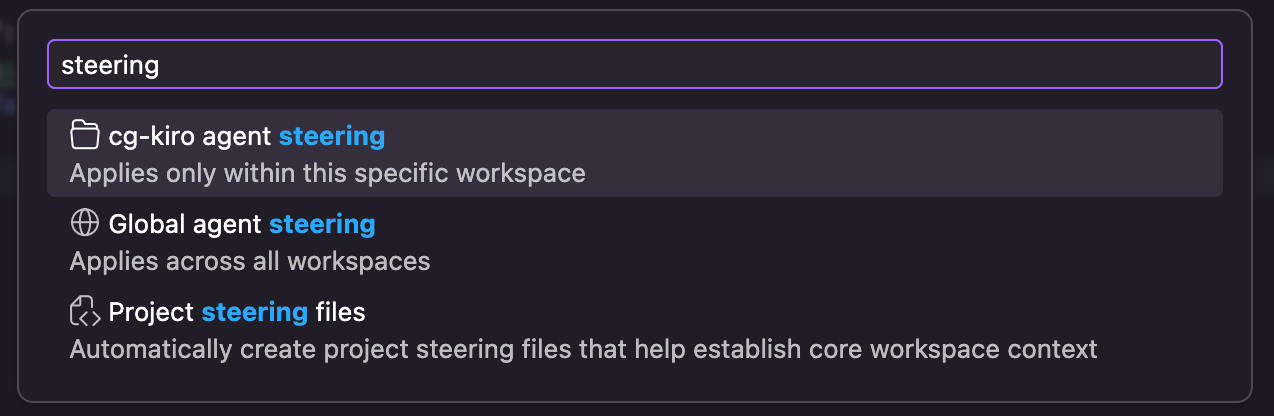
Copy the prompt into a Kiro steering file so every generation follows the right SDK patterns.
Add the CoinGecko MCP to your config:
```json Free (Keyless) theme={null}
"coingecko": {
"url": "https://mcp.api.coingecko.com/mcp",
"disabled": false
}
```
```json Use your API key theme={null}
"coingecko": {
"url": "https://mcp.pro-api.coingecko.com/mcp",
"disabled": false
}
```
> Full details: [CoinGecko MCP](/ai-integration/mcp-server)
Lets Kiro search CoinGecko documentation directly — endpoint references, guides, and tutorials.
Add to the same MCP config:
```json theme={null}
"coingecko-docs": {
"url": "https://docs.coingecko.com/mcp",
"disabled": false
}
```
> Full details: [Docs MCP](/ai-integration/docs-mcp)
## SDK Prompts (Steering)
Copy the prompt into a Kiro steering file so every generation follows the right SDK patterns.
 # CoinGecko Python SDK — AI Prompt Rules
## Install
```
pip install coingecko_sdk
```
## Client Setup
```python theme={null}
import os
from coingecko_sdk import Coingecko
client = Coingecko(
pro_api_key=os.environ.get("YOUR_API_KEY"),
environment="pro", # or "demo" with demo_api_key
max_retries=2,
)
```
* Load API keys from environment variables. Never hardcode.
* Initialize one reusable client instance.
* For async: use `AsyncCoingecko` with `await`.
## Finding Methods
Methods map to endpoint paths using snake\_case, but names are **not always predictable**
— path parameters like `{address}` may become part of the method name
(e.g. `get_address()`, `get_addresses()`, `get_network()`).
**Before using any SDK method, you MUST verify the exact method name.** Do not guess.
1. **Check the reference page first** — every endpoint page includes an SDK Examples section
at the bottom with copy-ready code:
* URL pattern: `https://docs.coingecko.com/reference/{operationId}`
* Look for the `#### SDK Examples` block and use the Python snippet exactly as shown.
2. **Full method list** — if you need to search across all methods:
`https://docs.coingecko.com/docs/sdk-python-methods`
3. **Parameter details and endpoint caveats**:
`https://docs.coingecko.com/reference/{operationId}`
## Error Handling
Catch specific SDK exceptions — never use bare `except Exception`.
```python theme={null}
import coingecko_sdk
try:
response = client.simple.price.get(vs_currencies="usd", ids="bitcoin")
except coingecko_sdk.RateLimitError:
# Back off — 429 received
pass
except coingecko_sdk.NotFoundError:
# Invalid coin ID or endpoint
pass
except coingecko_sdk.APIError as e:
print(e.status_code, e.response)
```
## Rules
* ALWAYS use `coingecko_sdk`. Never use `pycoingecko` or raw `requests`/`httpx`.
* Rely on the SDK's built-in retry (`max_retries`). Never write manual retry loops.
* Responses are Pydantic models — use `.to_dict()` or `.to_json()` when needed.
* Use `client.with_options()` for per-request overrides (timeout, retries).
# CoinGecko TypeScript SDK — AI Prompt Rules
## Install
```
npm install @coingecko/coingecko-typescript
```
## Client Setup
```typescript theme={null}
import Coingecko from '@coingecko/coingecko-typescript';
const client = new Coingecko({
proAPIKey: process.env['YOUR_API_KEY'],
environment: 'pro', // or 'demo' with demoAPIKey
maxRetries: 2,
});
```
* Load API keys from environment variables. Never hardcode.
* Initialize one reusable client instance.
## Finding Methods
Methods map to endpoint paths using camelCase, but names are **not always predictable**
— path parameters like `{address}` may become part of the method name
(e.g. `getAddress()`, `getAddresses()`, `getNetwork()`, `getID()`).
**Before using any SDK method, you MUST verify the exact method name.** Do not guess.
1. **Check the reference page first** — every endpoint page includes an SDK Examples section
at the bottom with copy-ready code:
* URL pattern: `https://docs.coingecko.com/reference/{operationId}`
* Look for the `#### SDK Examples` block and use the TypeScript snippet exactly as shown.
2. **Full method list** — if you need to search across all methods:
`https://docs.coingecko.com/docs/sdk-typescript-methods`
3. **Parameter details and endpoint caveats**:
`https://docs.coingecko.com/reference/{operationId}`
## Error Handling
Catch specific SDK exceptions — never use bare `catch (e)` without checking the type.
```typescript theme={null}
import Coingecko from '@coingecko/coingecko-typescript';
try {
const response = await client.simple.price.get({ vs_currencies: 'usd', ids: 'bitcoin' });
} catch (err) {
if (err instanceof Coingecko.RateLimitError) {
// Back off — 429 received
} else if (err instanceof Coingecko.NotFoundError) {
// Invalid coin ID or endpoint
} else if (err instanceof Coingecko.APIError) {
console.log(err.status, err.headers);
} else {
throw err;
}
}
```
## Rules
* ALWAYS use `@coingecko/coingecko-typescript`. Never use raw `fetch`/`axios`/`node-fetch`.
* Rely on the SDK's built-in retry (`maxRetries`). Never write manual retry loops.
* Use SDK types for params and responses: `Coingecko.Simple.PriceGetParams`, `Coingecko.Simple.PriceGetResponse`.
* Use the second argument for per-request overrides: `client.simple.price.get(params, { maxRetries: 5 })`.
## Try It Out
Once everything's wired up, try asking Kiro:
* *"Using the CoinGecko MCP, show me the top 10 trending pools on Base and export them to CSV."*
* *"Write a Python script using coingecko-sdk that tracks my portfolio and alerts if any coin moves more than 10% in an hour."*
# CoinGecko Python SDK — AI Prompt Rules
## Install
```
pip install coingecko_sdk
```
## Client Setup
```python theme={null}
import os
from coingecko_sdk import Coingecko
client = Coingecko(
pro_api_key=os.environ.get("YOUR_API_KEY"),
environment="pro", # or "demo" with demo_api_key
max_retries=2,
)
```
* Load API keys from environment variables. Never hardcode.
* Initialize one reusable client instance.
* For async: use `AsyncCoingecko` with `await`.
## Finding Methods
Methods map to endpoint paths using snake\_case, but names are **not always predictable**
— path parameters like `{address}` may become part of the method name
(e.g. `get_address()`, `get_addresses()`, `get_network()`).
**Before using any SDK method, you MUST verify the exact method name.** Do not guess.
1. **Check the reference page first** — every endpoint page includes an SDK Examples section
at the bottom with copy-ready code:
* URL pattern: `https://docs.coingecko.com/reference/{operationId}`
* Look for the `#### SDK Examples` block and use the Python snippet exactly as shown.
2. **Full method list** — if you need to search across all methods:
`https://docs.coingecko.com/docs/sdk-python-methods`
3. **Parameter details and endpoint caveats**:
`https://docs.coingecko.com/reference/{operationId}`
## Error Handling
Catch specific SDK exceptions — never use bare `except Exception`.
```python theme={null}
import coingecko_sdk
try:
response = client.simple.price.get(vs_currencies="usd", ids="bitcoin")
except coingecko_sdk.RateLimitError:
# Back off — 429 received
pass
except coingecko_sdk.NotFoundError:
# Invalid coin ID or endpoint
pass
except coingecko_sdk.APIError as e:
print(e.status_code, e.response)
```
## Rules
* ALWAYS use `coingecko_sdk`. Never use `pycoingecko` or raw `requests`/`httpx`.
* Rely on the SDK's built-in retry (`max_retries`). Never write manual retry loops.
* Responses are Pydantic models — use `.to_dict()` or `.to_json()` when needed.
* Use `client.with_options()` for per-request overrides (timeout, retries).
# CoinGecko TypeScript SDK — AI Prompt Rules
## Install
```
npm install @coingecko/coingecko-typescript
```
## Client Setup
```typescript theme={null}
import Coingecko from '@coingecko/coingecko-typescript';
const client = new Coingecko({
proAPIKey: process.env['YOUR_API_KEY'],
environment: 'pro', // or 'demo' with demoAPIKey
maxRetries: 2,
});
```
* Load API keys from environment variables. Never hardcode.
* Initialize one reusable client instance.
## Finding Methods
Methods map to endpoint paths using camelCase, but names are **not always predictable**
— path parameters like `{address}` may become part of the method name
(e.g. `getAddress()`, `getAddresses()`, `getNetwork()`, `getID()`).
**Before using any SDK method, you MUST verify the exact method name.** Do not guess.
1. **Check the reference page first** — every endpoint page includes an SDK Examples section
at the bottom with copy-ready code:
* URL pattern: `https://docs.coingecko.com/reference/{operationId}`
* Look for the `#### SDK Examples` block and use the TypeScript snippet exactly as shown.
2. **Full method list** — if you need to search across all methods:
`https://docs.coingecko.com/docs/sdk-typescript-methods`
3. **Parameter details and endpoint caveats**:
`https://docs.coingecko.com/reference/{operationId}`
## Error Handling
Catch specific SDK exceptions — never use bare `catch (e)` without checking the type.
```typescript theme={null}
import Coingecko from '@coingecko/coingecko-typescript';
try {
const response = await client.simple.price.get({ vs_currencies: 'usd', ids: 'bitcoin' });
} catch (err) {
if (err instanceof Coingecko.RateLimitError) {
// Back off — 429 received
} else if (err instanceof Coingecko.NotFoundError) {
// Invalid coin ID or endpoint
} else if (err instanceof Coingecko.APIError) {
console.log(err.status, err.headers);
} else {
throw err;
}
}
```
## Rules
* ALWAYS use `@coingecko/coingecko-typescript`. Never use raw `fetch`/`axios`/`node-fetch`.
* Rely on the SDK's built-in retry (`maxRetries`). Never write manual retry loops.
* Use SDK types for params and responses: `Coingecko.Simple.PriceGetParams`, `Coingecko.Simple.PriceGetResponse`.
* Use the second argument for per-request overrides: `client.simple.price.get(params, { maxRetries: 5 })`.
## Try It Out
Once everything's wired up, try asking Kiro:
* *"Using the CoinGecko MCP, show me the top 10 trending pools on Base and export them to CSV."*
* *"Write a Python script using coingecko-sdk that tracks my portfolio and alerts if any coin moves more than 10% in an hour."*