> ## Documentation Index
> Fetch the complete documentation index at: https://docs.coingecko.com/llms.txt
> Use this file to discover all available pages before exploring further.
# 1. Get data by ID or Address
## Methods to query price & market data of coins
### a. Coin ID
Using [/simple/price](/reference/simple-price) endpoint as example:
* `https://pro-api.coingecko.com/api/v3/simple/price?ids=bitcoin&vs_currencies=usd&x_cg_pro_api_key=YOUR_API_KEY`
* The provided endpoint URL includes parameters such as `ids=bitcoin` and `vs_currencies=usd`, indicating that the intention to retrieve the current price of Bitcoin in US Dollars.
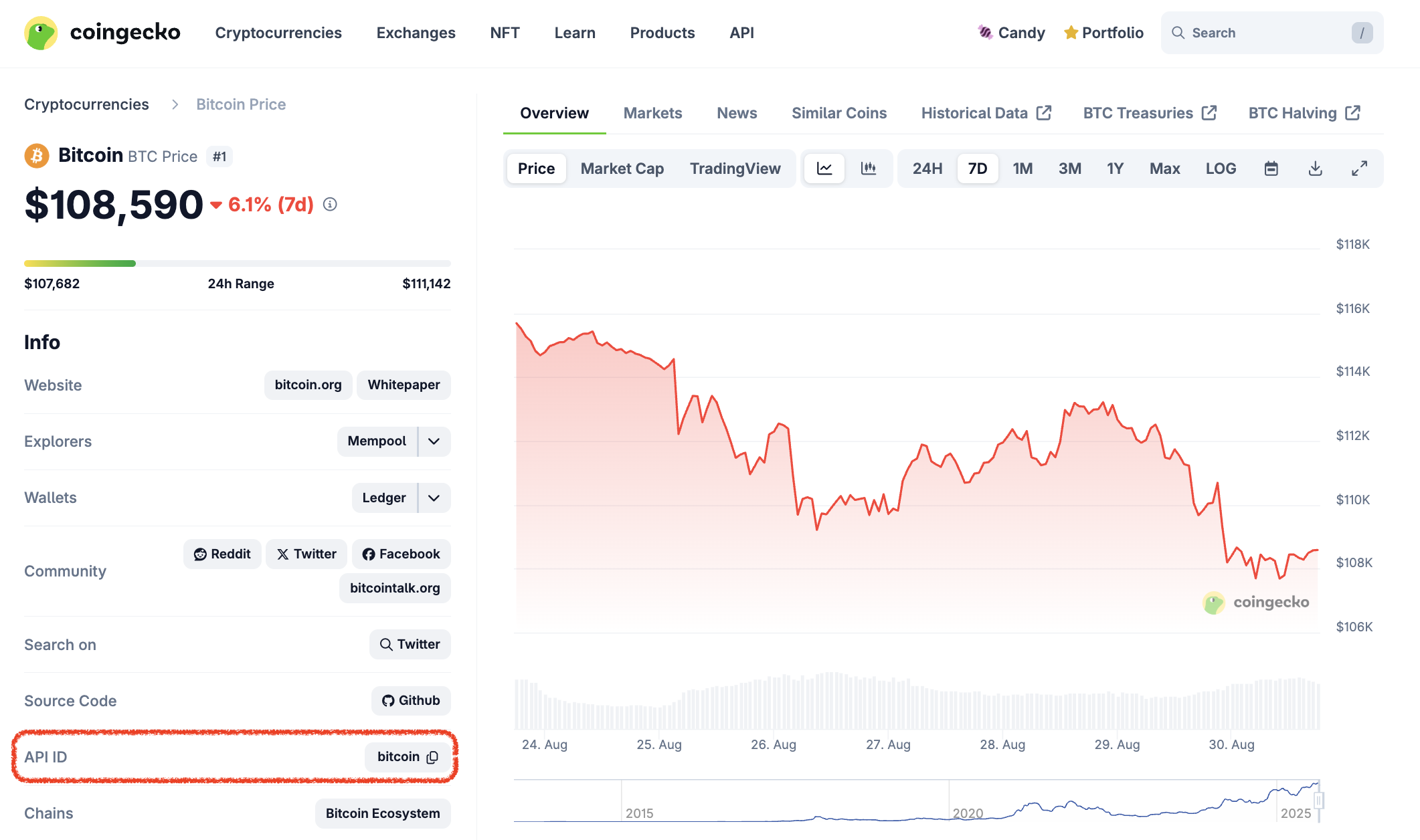
**How to obtain Coin ID aka API ID?** There are 3 options:
* Use [/coins/list](/reference/coins-list) endpoint, example of responses:
```json JSON theme={null}
[
......
{
"id": "bitcoin", 👈
"symbol": "btc",
"name": "Bitcoin"
},
......
]
```
* View the full list of coins with API ID, symbol and name using this [Google Sheet](https://docs.google.com/spreadsheets/d/1wTTuxXt8n9q7C4NDXqQpI3wpKu1_5bGVmP9Xz0XGSyU/edit?usp=sharing).
* Look for the "API ID“ by visiting the info section of a coin page on CoinGecko:
 ### b. Contract Address
Other than using Coin ID, you may also query price & market data of a coin using contract address, using [/simple/token\_price/\{id](/reference/simple-token-price)} endpoint as example:
* `https://pro-api.coingecko.com/api/v3/simple/token_price/ethereum?contract_addresses=0xa0b86991c6218b36c1d19d4a2e9eb0ce3606eb48&vs_currencies=usd&x_cg_pro_api_key=YOUR_API_KEY`
There are 3 parameters values required to apply for this endpoint:
* `id`: `Ethereum` (Asset Platform ID)
* `contract_addresses`: `0xa0b86991c6218b36c1d19d4a2e9eb0ce3606eb48` (Contract Address)
* `vs_currencies`: `usd` (Target Currencies)
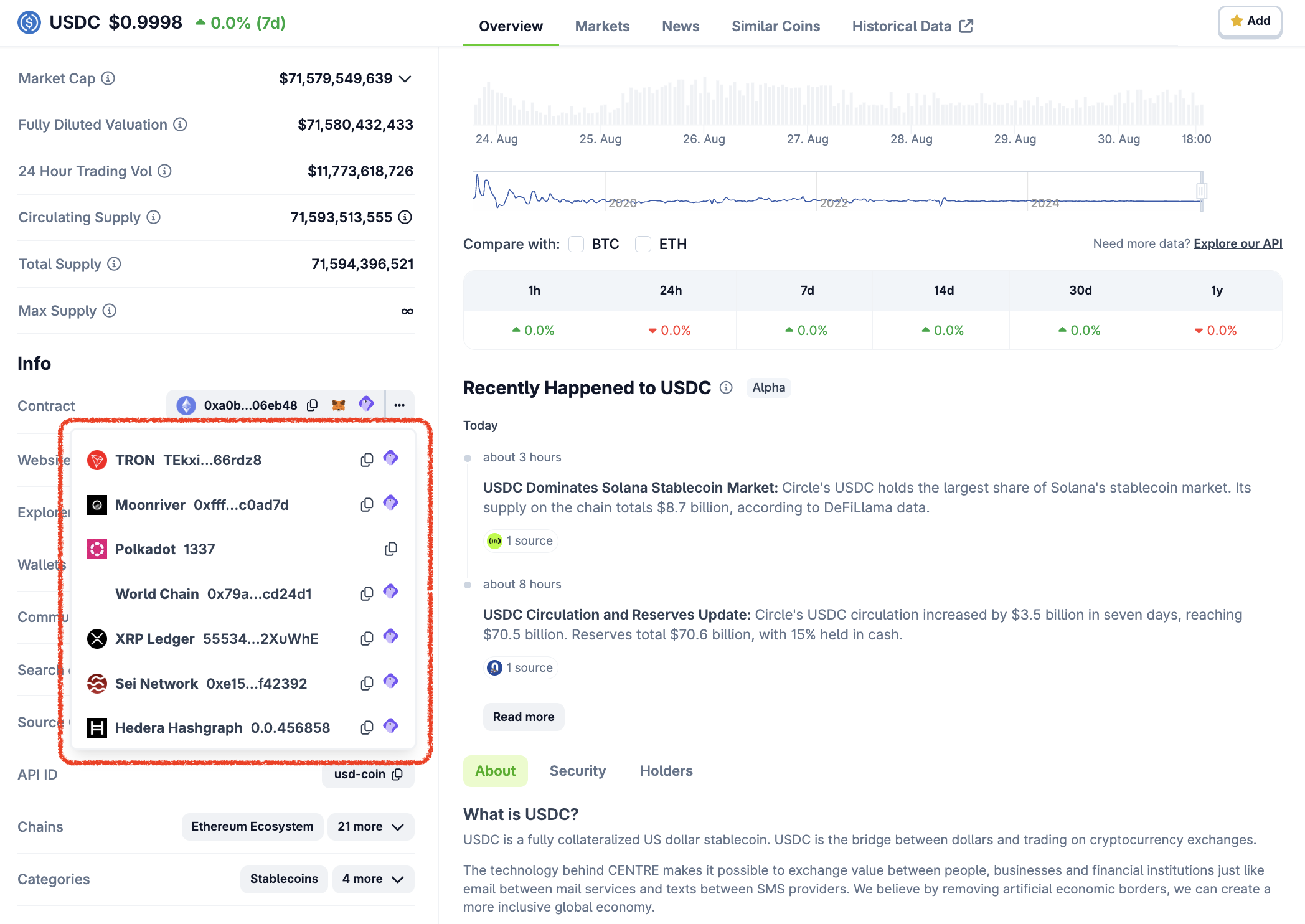
**How to obtain Coins/Tokens Contract Address**
* Use [/coins/list](/reference/coins-list) endpoint (`include_platform=true`), example of responses:
```json JSON theme={null}
[
......
{
"id": "1inch",
"symbol": "1inch",
"name": "1inch",
"platforms": {
"ethereum": "0x111111111117dc0aa78b770fa6a738034120c302",
"avalanche": "0xd501281565bf7789224523144fe5d98e8b28f267",
"binance-smart-chain": "0x111111111117dc0aa78b770fa6a738034120c302",
"near-protocol": "111111111117dc0aa78b770fa6a738034120c302.factory.bridge.near",
"energi": "0xdda6205dc3f47e5280eb726613b27374eee9d130",
"harmony-shard-0": "0x58f1b044d8308812881a1433d9bbeff99975e70c",
"polygon-pos": "0x9c2c5fd7b07e95ee044ddeba0e97a665f142394f"
}
},
......
]
```
* Look for the "Contract“ by visiting the info section of a coin page on CoinGecko.
### Notes
* Not all coins will have a contract address listed on the CoinGecko site.
* If an address is not shown on the CoinGecko page, you will not be able to query the coin by its contract address via the API.
* The contract addresses are curated by the CoinGecko team, if you find out any missing contract address, feel free to [share](https://support.coingecko.com/hc/en-us/requests/new) with us to review.
### b. Contract Address
Other than using Coin ID, you may also query price & market data of a coin using contract address, using [/simple/token\_price/\{id](/reference/simple-token-price)} endpoint as example:
* `https://pro-api.coingecko.com/api/v3/simple/token_price/ethereum?contract_addresses=0xa0b86991c6218b36c1d19d4a2e9eb0ce3606eb48&vs_currencies=usd&x_cg_pro_api_key=YOUR_API_KEY`
There are 3 parameters values required to apply for this endpoint:
* `id`: `Ethereum` (Asset Platform ID)
* `contract_addresses`: `0xa0b86991c6218b36c1d19d4a2e9eb0ce3606eb48` (Contract Address)
* `vs_currencies`: `usd` (Target Currencies)
**How to obtain Coins/Tokens Contract Address**
* Use [/coins/list](/reference/coins-list) endpoint (`include_platform=true`), example of responses:
```json JSON theme={null}
[
......
{
"id": "1inch",
"symbol": "1inch",
"name": "1inch",
"platforms": {
"ethereum": "0x111111111117dc0aa78b770fa6a738034120c302",
"avalanche": "0xd501281565bf7789224523144fe5d98e8b28f267",
"binance-smart-chain": "0x111111111117dc0aa78b770fa6a738034120c302",
"near-protocol": "111111111117dc0aa78b770fa6a738034120c302.factory.bridge.near",
"energi": "0xdda6205dc3f47e5280eb726613b27374eee9d130",
"harmony-shard-0": "0x58f1b044d8308812881a1433d9bbeff99975e70c",
"polygon-pos": "0x9c2c5fd7b07e95ee044ddeba0e97a665f142394f"
}
},
......
]
```
* Look for the "Contract“ by visiting the info section of a coin page on CoinGecko.
### Notes
* Not all coins will have a contract address listed on the CoinGecko site.
* If an address is not shown on the CoinGecko page, you will not be able to query the coin by its contract address via the API.
* The contract addresses are curated by the CoinGecko team, if you find out any missing contract address, feel free to [share](https://support.coingecko.com/hc/en-us/requests/new) with us to review.
 * Get the token contract address from project website, white-paper, documentation, or block explorer site:
* [Uniswap Documentation](https://docs.uniswap.org/protocol/concepts/governance/overview#uni-address)
* [Block Explorer (Etherscan)](https://etherscan.io/token/0x1f9840a85d5af5bf1d1762f925bdaddc4201f984)
## Specify target currency to return
In the 2 examples above, both queries for Coin ID and Contract Address contain `vs_currencies=usd`. Most of the CoinGecko API endpoints will require you to specify the currency.
CoinGecko API data supports all major fiat currencies and some famous crypto currencies like the following:
| Type | Currency | vs\_currencies (Param value) |
| -------------- | ------------ | ---------------------------- |
| Fiat | US Dollar | `usd` |
| Fiat | Japanese Yen | `jpy` |
| Fiat | Euro | `eur` |
| Cryptocurrency | Bitcoin | `btc` |
| Cryptocurrency | Ether | `eth` |
| Cryptocurrency | Binance Coin | `bnb` |
For full list of supported currencies, please go to [/simple/supported\_vs\_currencies](/reference/simple-supported-currencies) endpoint
## Other way to obtain coin prices & market data
Using [/coins/market ](/reference/coins-markets) endpoint as example to query prices and market data of coins in bulk
* `https://pro-api.coingecko.com/api/v3/coins/markets?vs_currency=usd&order=market_cap_desc&per_page=100&page=1&x_cg_pro_api_key=YOUR_API_KEY`
There are 4 parameters values applied for this endpoint:
* `vs_currency`: `usd`
* `order`: `market_cap_desc` — The endpoint response will be sorted in descending order, from the coins with the largest market cap to those with the smallest.
* `per_page`: `100` — The results of coins per page are set at 100 in this case (maximum is 250).
* `page`: `1` — The page number of the results is determined by the parameter `per_page`. In the case of `per_page=100` and `page=2`, the responses will include coins ranked 101 to 200 on CoinGecko, sorted by market cap, as per the specified endpoint.
* Get the token contract address from project website, white-paper, documentation, or block explorer site:
* [Uniswap Documentation](https://docs.uniswap.org/protocol/concepts/governance/overview#uni-address)
* [Block Explorer (Etherscan)](https://etherscan.io/token/0x1f9840a85d5af5bf1d1762f925bdaddc4201f984)
## Specify target currency to return
In the 2 examples above, both queries for Coin ID and Contract Address contain `vs_currencies=usd`. Most of the CoinGecko API endpoints will require you to specify the currency.
CoinGecko API data supports all major fiat currencies and some famous crypto currencies like the following:
| Type | Currency | vs\_currencies (Param value) |
| -------------- | ------------ | ---------------------------- |
| Fiat | US Dollar | `usd` |
| Fiat | Japanese Yen | `jpy` |
| Fiat | Euro | `eur` |
| Cryptocurrency | Bitcoin | `btc` |
| Cryptocurrency | Ether | `eth` |
| Cryptocurrency | Binance Coin | `bnb` |
For full list of supported currencies, please go to [/simple/supported\_vs\_currencies](/reference/simple-supported-currencies) endpoint
## Other way to obtain coin prices & market data
Using [/coins/market ](/reference/coins-markets) endpoint as example to query prices and market data of coins in bulk
* `https://pro-api.coingecko.com/api/v3/coins/markets?vs_currency=usd&order=market_cap_desc&per_page=100&page=1&x_cg_pro_api_key=YOUR_API_KEY`
There are 4 parameters values applied for this endpoint:
* `vs_currency`: `usd`
* `order`: `market_cap_desc` — The endpoint response will be sorted in descending order, from the coins with the largest market cap to those with the smallest.
* `per_page`: `100` — The results of coins per page are set at 100 in this case (maximum is 250).
* `page`: `1` — The page number of the results is determined by the parameter `per_page`. In the case of `per_page=100` and `page=2`, the responses will include coins ranked 101 to 200 on CoinGecko, sorted by market cap, as per the specified endpoint.