> ## Documentation Index
> Fetch the complete documentation index at: https://docs.coingecko.com/llms.txt
> Use this file to discover all available pages before exploring further.
# CoinGecko MCP
> Connect AI agents to real-time crypto data via the CoinGecko MCP Server
 Live and historical prices, market caps, and trading volumes.
Exchange data, trending coins, and market analytics.
Token and pool data across DEXes and networks.
## Servers
| Server | Endpoint | Details |
| ------------------------------------- | ------------------------------------------------------------------------------------ | ------------------------------------------------------------------------------------------------------------------------------------------- |
| **Free (Keyless)** | `https://mcp.api.coingecko.com/mcp` | No API key needed.
Live and historical prices, market caps, and trading volumes.
Exchange data, trending coins, and market analytics.
Token and pool data across DEXes and networks.
## Servers
| Server | Endpoint | Details |
| ------------------------------------- | ------------------------------------------------------------------------------------ | ------------------------------------------------------------------------------------------------------------------------------------------- |
| **Free (Keyless)** | `https://mcp.api.coingecko.com/mcp` | No API key needed.
Shared rate limits. |
| **Use your API key** | `https://mcp.pro-api.coingecko.com/mcp` | [CoinGecko API key](https://www.coingecko.com/en/api/pricing) required.
Higher limits, full tool set. |
| **[Local](#setup-your-local-server)** | [`@coingecko/coingecko-mcp`](https://www.npmjs.com/package/@coingecko/coingecko-mcp) | Pro or Demo API key.
Runs on your machine. [GitHub →](https://github.com/coingecko/coingecko-typescript/tree/main/packages/mcp-server) |
* Both servers support `/mcp` (Streamable HTTP) and `/sse` (Server-Sent Events).
* Always prefer `/mcp` — only fall back to `/sse` if your client doesn't support Streamable HTTP.
> See the full list of [available tools and methods](/ai-integration/mcp-tools).
## Connect to Remote Server
Go to [Settings > Connectors](https://claude.ai/customize/connectors?modal=add-custom-connector) on claude.ai.
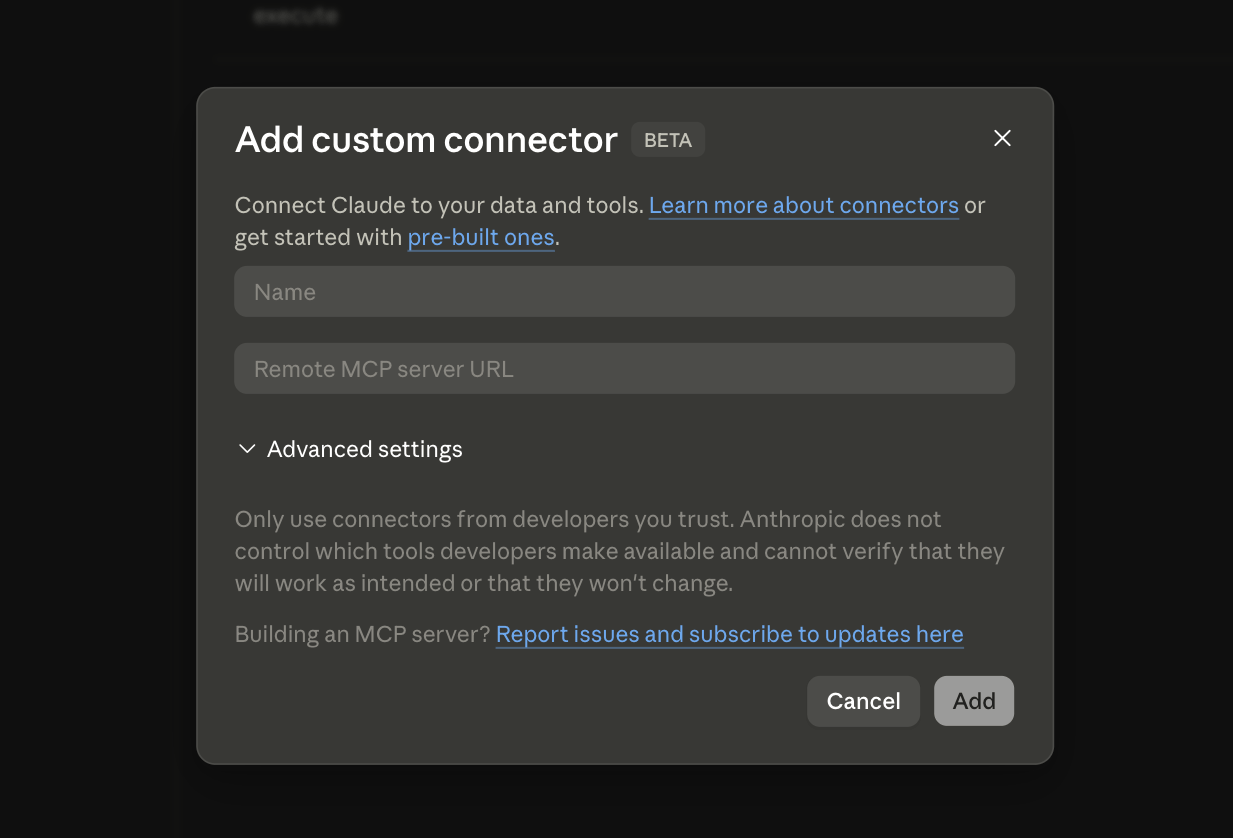 * **Name:** `CoinGecko`
* **Remote MCP server URL:**
| Server | URL |
| -------------------- | --------------------------------------- |
| **Free (Keyless)** | `https://mcp.api.coingecko.com/mcp` |
| **Use your API key** | `https://mcp.pro-api.coingecko.com/mcp` |
Click **Add**.
Using your API key opens a browser tab to enter it on first connection.
* **Name:** `CoinGecko`
* **Remote MCP server URL:**
| Server | URL |
| -------------------- | --------------------------------------- |
| **Free (Keyless)** | `https://mcp.api.coingecko.com/mcp` |
| **Use your API key** | `https://mcp.pro-api.coingecko.com/mcp` |
Click **Add**.
Using your API key opens a browser tab to enter it on first connection.
[Get an API key →](https://www.coingecko.com/en/api/pricing)
Edit `claude_desktop_config.json` ([find this file](https://modelcontextprotocol.io/docs/develop/connect-local-servers)).
```json Free (Keyless) theme={null}
{
"mcpServers": {
"coingecko": {
"command": "npx",
"args": [
"mcp-remote",
"https://mcp.api.coingecko.com/mcp"
]
}
}
}
```
```json Use your API key theme={null}
{
"mcpServers": {
"coingecko": {
"command": "npx",
"args": [
"mcp-remote",
"https://mcp.pro-api.coingecko.com/mcp"
]
}
}
}
```
Requires [Node.js](https://nodejs.org/en/download).
Using your API key opens a browser tab to enter it on first connection.
[Get an API key →](https://www.coingecko.com/en/api/pricing)
Restart to load the new server.
```bash Free (Keyless) theme={null}
claude mcp add --transport http \
coingecko https://mcp.api.coingecko.com/mcp
```
```bash Use your API key theme={null}
claude mcp add --transport http \
coingecko https://mcp.pro-api.coingecko.com/mcp
```
If **using your API key**, run `/mcp` inside a Claude Code session to authenticate:
```bash Example Session theme={null}
❯ /mcp
Manage MCP servers
1 server
❯ coingecko · △ needs authentication
↑↓ to navigate · Enter to confirm · Esc to cancel
```
```bash theme={null}
claude mcp list
```
## Setup your Local Server
Run the server on your machine using [`@coingecko/coingecko-mcp`](https://www.npmjs.com/package/@coingecko/coingecko-mcp). Requires [Node.js](https://nodejs.org/en/download).
Edit `claude_desktop_config.json` ([find this file](https://modelcontextprotocol.io/docs/develop/connect-local-servers)).
```json Pro API Key theme={null}
{
"mcpServers": {
"coingecko": {
"command": "npx",
"args": [
"-y",
"@coingecko/coingecko-mcp"
],
"env": {
"COINGECKO_PRO_API_KEY": "YOUR_API_KEY",
"COINGECKO_ENVIRONMENT": "pro"
}
}
}
}
```
```json Demo API Key theme={null}
{
"mcpServers": {
"coingecko": {
"command": "npx",
"args": [
"-y",
"@coingecko/coingecko-mcp"
],
"env": {
"COINGECKO_DEMO_API_KEY": "YOUR_API_KEY",
"COINGECKO_ENVIRONMENT": "demo"
}
}
}
}
```
> Replace `YOUR_API_KEY` with your actual API key.
> [Get a free Demo key or upgrade to Pro →](https://www.coingecko.com/en/api/pricing)
Restart to load the new server.
```bash Pro API Key theme={null}
claude mcp add coingecko \
-e COINGECKO_PRO_API_KEY=YOUR_API_KEY \
-e COINGECKO_ENVIRONMENT=pro \
-- npx -y @coingecko/coingecko-mcp
```
```bash Demo API Key theme={null}
claude mcp add coingecko \
-e COINGECKO_DEMO_API_KEY=YOUR_API_KEY \
-e COINGECKO_ENVIRONMENT=demo \
-- npx -y @coingecko/coingecko-mcp
```
> Replace `YOUR_API_KEY` with your actual API key.
> [Get a free Demo key or upgrade to Pro →](https://www.coingecko.com/en/api/pricing)
```bash theme={null}
claude mcp list
```
## FAQ
The Free server requires no authentication and uses shared rate limits. The API key server gives you higher rate limits and access to the full tool set — including premium endpoints available on your [CoinGecko plan](https://www.coingecko.com/en/api/pricing).
Use a local server if you need full control over the runtime, want to avoid browser-based OAuth, or prefer passing your API key via environment variables instead of the browser auth flow.
`/mcp` uses Streamable HTTP — the newer, recommended transport. `/sse` uses Server-Sent Events, an older protocol. Always prefer `/mcp` unless your client only supports SSE.
Any client that supports the [Model Context Protocol](https://modelcontextprotocol.io) — including Claude (Web, Desktop, Code), Cursor, Windsurf, and others. The setup steps on this page use Claude as an example, but the endpoints and configs work with any MCP-compatible client.
Yes. Each tool call the AI makes through MCP triggers one or more API requests, which count toward your plan's rate limit and credits.
***
Help us improve MCP — share your suggestions and feedback.