> ## Documentation Index
> Fetch the complete documentation index at: https://docs.coingecko.com/llms.txt
> Use this file to discover all available pages before exploring further.
# CoinGecko for Microsoft Excel
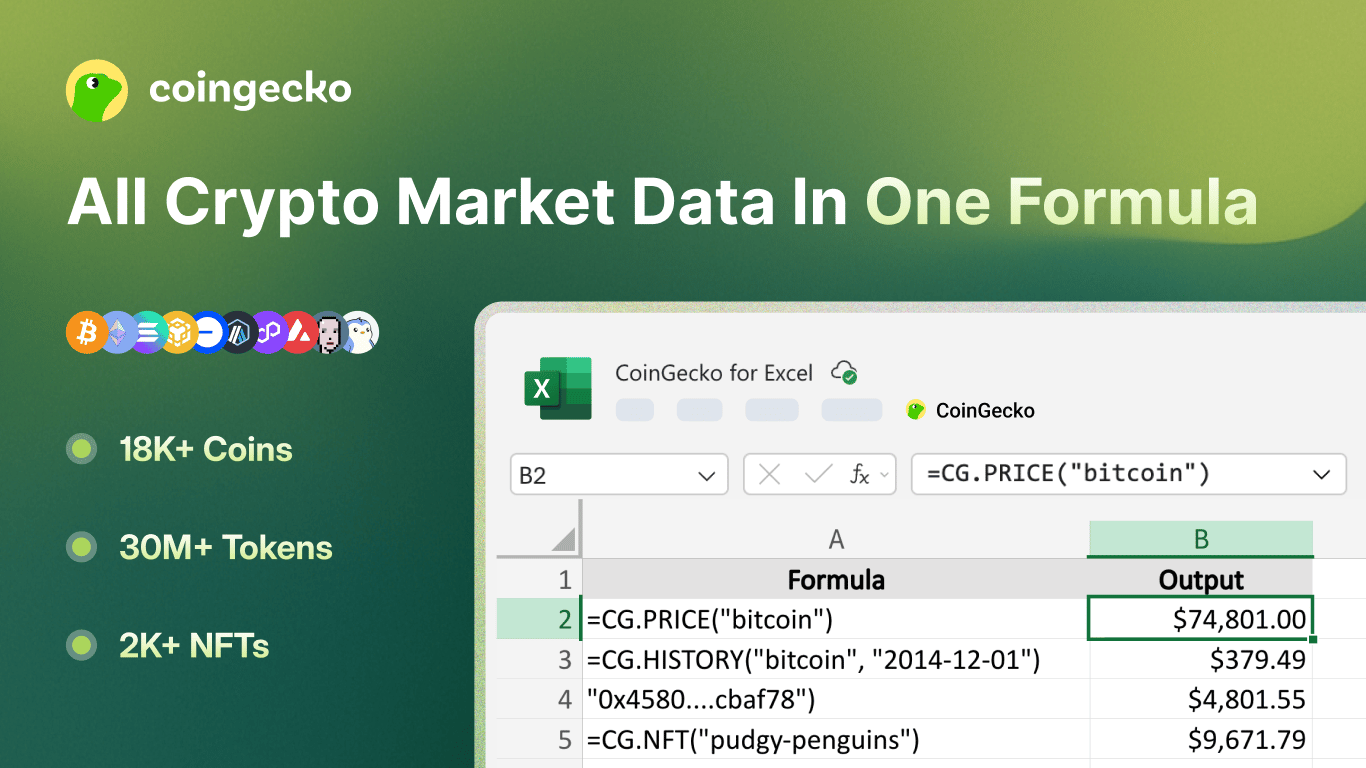
> Pull live prices, historical data, NFT floors, onchain token prices, and market cap rankings into Excel with =CG. formulas
 The add-in only communicates with the CoinGecko API using your saved API key. No personal data is sent to any third party.
## Quick Start
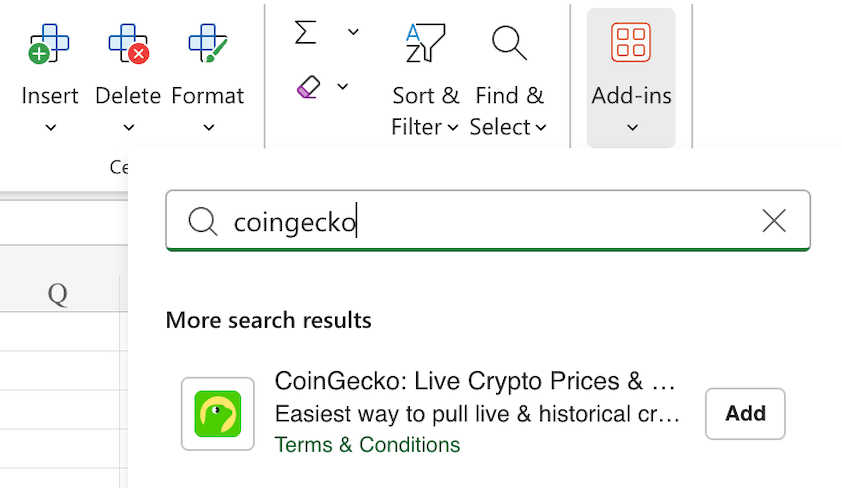
Search for **CoinGecko** in the Excel Add-ins store, or visit the [Microsoft Marketplace](https://marketplace.microsoft.com/en-us/product/office/WA200010662).
The add-in only communicates with the CoinGecko API using your saved API key. No personal data is sent to any third party.
## Quick Start
Search for **CoinGecko** in the Excel Add-ins store, or visit the [Microsoft Marketplace](https://marketplace.microsoft.com/en-us/product/office/WA200010662).
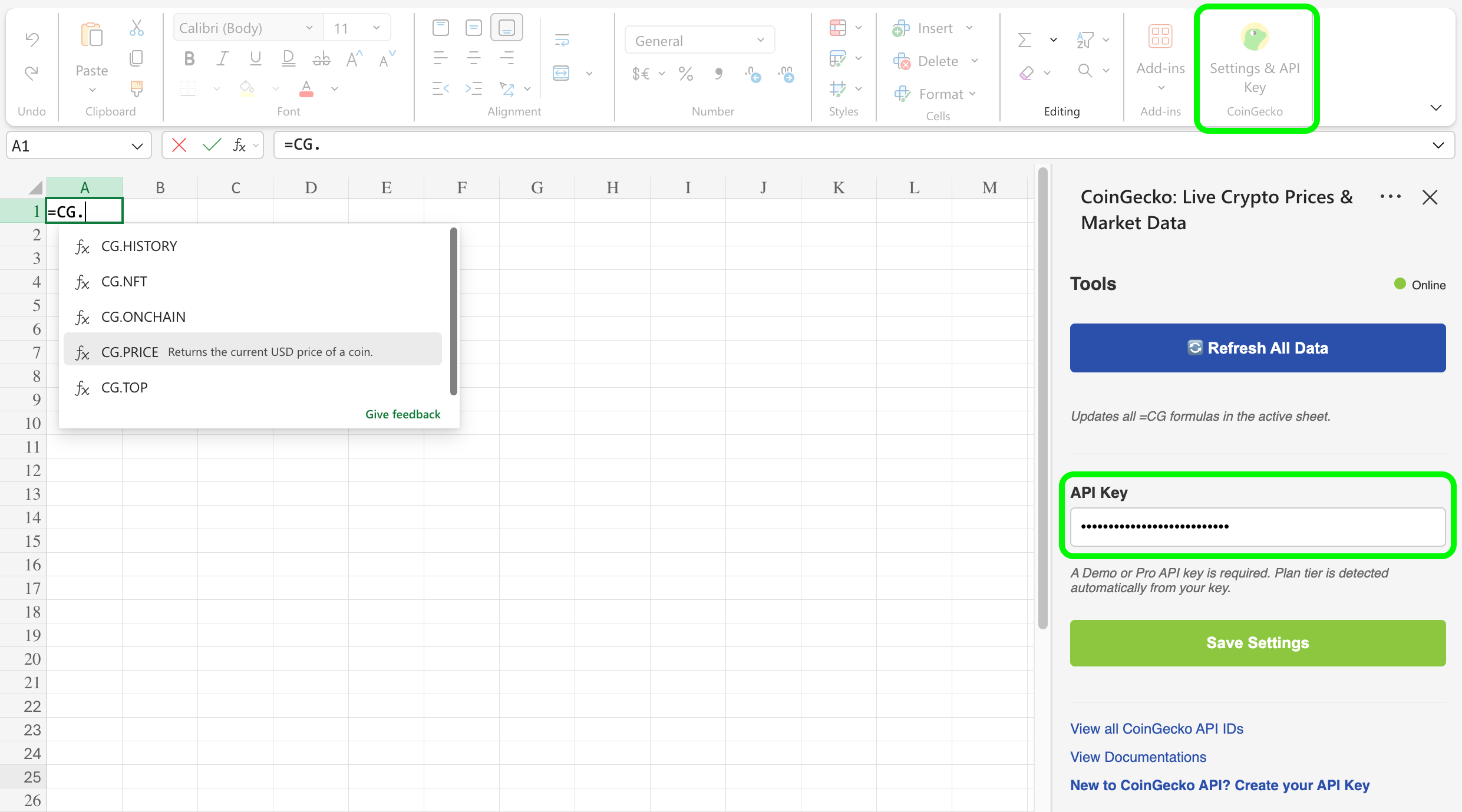
 Go to **Home** > **CoinGecko** in the Excel ribbon.
Enter your [CoinGecko API key](https://www.coingecko.com/en/api/pricing) and click **Save Settings**. A green status dot confirms a valid connection.
Go to **Home** > **CoinGecko** in the Excel ribbon.
Enter your [CoinGecko API key](https://www.coingecko.com/en/api/pricing) and click **Save Settings**. A green status dot confirms a valid connection.
 ## Formulas
All formulas use the `CG` namespace. Enter them in any cell like a standard Excel formula.
Use the **Coin ID** (e.g. `bitcoin`, `ethereum`) rather than the ticker symbol for the most reliable results.
* Find the coin ID in the URL on CoinGecko — e.g. `coingecko.com/en/coins/bitcoin`
* Browse the full list via [Coins List](/reference/coins-list) endpoint or this [Google Sheet](https://docs.google.com/spreadsheets/d/1wTTuxXt8n9q7C4NDXqQpI3wpKu1_5bGVmP9Xz0XGSyU/edit?gid=0#gid=0)
***
### `=CG.PRICE(id)`
Returns the **current USD price** of a coin.
| Parameter | Type | Description |
| --------- | ------ | ------------------------------------------------------------------------------------------------------------------------------------------------ |
| `id` | string | [Coin ID](https://docs.google.com/spreadsheets/d/1wTTuxXt8n9q7C4NDXqQpI3wpKu1_5bGVmP9Xz0XGSyU/edit?gid=0#gid=0) (e.g. `"bitcoin"`, `"ethereum"`) |
```text theme={null}
=CG.PRICE("bitcoin") → 95000
=CG.PRICE("ethereum") → 3400
=CG.PRICE("solana") → 180
```
***
### `=CG.HISTORY(id, date)`
Returns the **historical USD price** of a coin on a specific date.
| Parameter | Type | Description |
| --------- | ------ | --------------------------------------------------------------------------------------------------------------- |
| `id` | string | [Coin ID](https://docs.google.com/spreadsheets/d/1wTTuxXt8n9q7C4NDXqQpI3wpKu1_5bGVmP9Xz0XGSyU/edit?gid=0#gid=0) |
| `date` | string | Date in `YYYY-MM-DD` format |
```text theme={null}
=CG.HISTORY("bitcoin", "2023-12-31") → 16541.77
=CG.HISTORY("ethereum", "2021-12-31") → 3682.45
```
***
### `=CG.NFT(id)`
Returns the **current floor price (USD)** of an NFT collection.
| Parameter | Type | Description |
| --------- | ------ | -------------------------------------------------------------------------------------------------------------------------------------------------------------- |
| `id` | string | [NFT ID](https://docs.google.com/spreadsheets/d/1wTTuxXt8n9q7C4NDXqQpI3wpKu1_5bGVmP9Xz0XGSyU/edit?gid=207968092#gid=207968092) (e.g. `"bored-ape-yacht-club"`) |
```text theme={null}
=CG.NFT("bored-ape-yacht-club") → 24500
=CG.NFT("cryptopunks") → 68000
=CG.NFT("pudgy-penguins") → 8200
```
***
### `=CG.ONCHAIN(network, address)`
Returns the **current USD price** of an onchain token by network and contract address.
| Parameter | Type | Description |
| --------- | ------ | ------------------------------------------------------------------------------------------------------------------------------------------------------------------------ |
| `network` | string | [Network ID](https://docs.google.com/spreadsheets/d/1wTTuxXt8n9q7C4NDXqQpI3wpKu1_5bGVmP9Xz0XGSyU/edit?gid=1120233236#gid=1120233236) (e.g. `"eth"`, `"bsc"`, `"solana"`) |
| `address` | string | Token contract address |
```text theme={null}
=CG.ONCHAIN("eth", "0xa0b86991c6218b36c1d19d4a2e9eb0ce3606eb48")
=CG.ONCHAIN("bsc", "0x55d398326f99059ff775485246999027b3197955")
```
Common network IDs: `eth`, `bsc`, `solana`, `arbitrum`, `base`
***
### `=CG.TOP(limit, [category])`
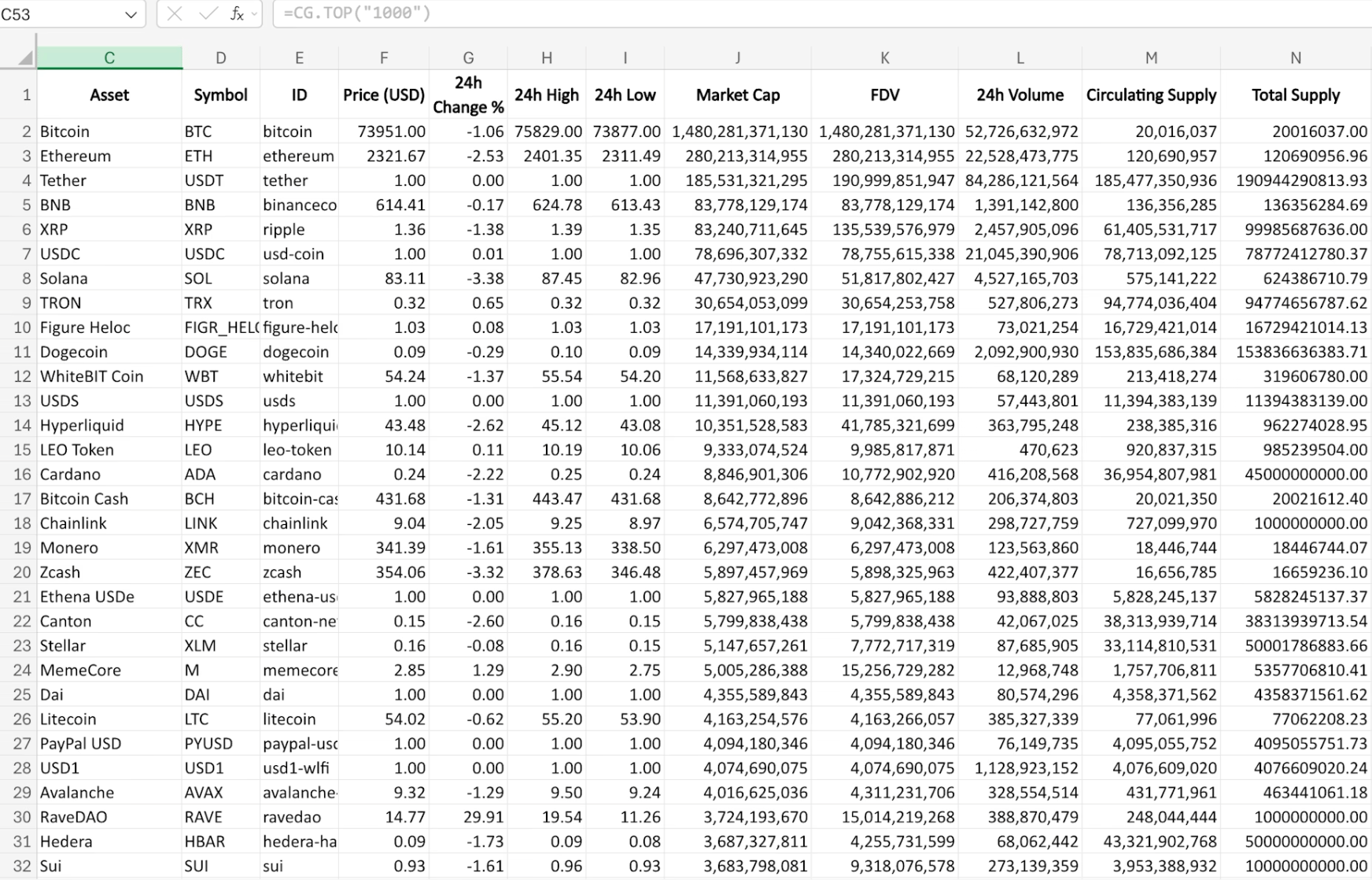
Returns a **ranked table of top coins by market cap**.
## Formulas
All formulas use the `CG` namespace. Enter them in any cell like a standard Excel formula.
Use the **Coin ID** (e.g. `bitcoin`, `ethereum`) rather than the ticker symbol for the most reliable results.
* Find the coin ID in the URL on CoinGecko — e.g. `coingecko.com/en/coins/bitcoin`
* Browse the full list via [Coins List](/reference/coins-list) endpoint or this [Google Sheet](https://docs.google.com/spreadsheets/d/1wTTuxXt8n9q7C4NDXqQpI3wpKu1_5bGVmP9Xz0XGSyU/edit?gid=0#gid=0)
***
### `=CG.PRICE(id)`
Returns the **current USD price** of a coin.
| Parameter | Type | Description |
| --------- | ------ | ------------------------------------------------------------------------------------------------------------------------------------------------ |
| `id` | string | [Coin ID](https://docs.google.com/spreadsheets/d/1wTTuxXt8n9q7C4NDXqQpI3wpKu1_5bGVmP9Xz0XGSyU/edit?gid=0#gid=0) (e.g. `"bitcoin"`, `"ethereum"`) |
```text theme={null}
=CG.PRICE("bitcoin") → 95000
=CG.PRICE("ethereum") → 3400
=CG.PRICE("solana") → 180
```
***
### `=CG.HISTORY(id, date)`
Returns the **historical USD price** of a coin on a specific date.
| Parameter | Type | Description |
| --------- | ------ | --------------------------------------------------------------------------------------------------------------- |
| `id` | string | [Coin ID](https://docs.google.com/spreadsheets/d/1wTTuxXt8n9q7C4NDXqQpI3wpKu1_5bGVmP9Xz0XGSyU/edit?gid=0#gid=0) |
| `date` | string | Date in `YYYY-MM-DD` format |
```text theme={null}
=CG.HISTORY("bitcoin", "2023-12-31") → 16541.77
=CG.HISTORY("ethereum", "2021-12-31") → 3682.45
```
***
### `=CG.NFT(id)`
Returns the **current floor price (USD)** of an NFT collection.
| Parameter | Type | Description |
| --------- | ------ | -------------------------------------------------------------------------------------------------------------------------------------------------------------- |
| `id` | string | [NFT ID](https://docs.google.com/spreadsheets/d/1wTTuxXt8n9q7C4NDXqQpI3wpKu1_5bGVmP9Xz0XGSyU/edit?gid=207968092#gid=207968092) (e.g. `"bored-ape-yacht-club"`) |
```text theme={null}
=CG.NFT("bored-ape-yacht-club") → 24500
=CG.NFT("cryptopunks") → 68000
=CG.NFT("pudgy-penguins") → 8200
```
***
### `=CG.ONCHAIN(network, address)`
Returns the **current USD price** of an onchain token by network and contract address.
| Parameter | Type | Description |
| --------- | ------ | ------------------------------------------------------------------------------------------------------------------------------------------------------------------------ |
| `network` | string | [Network ID](https://docs.google.com/spreadsheets/d/1wTTuxXt8n9q7C4NDXqQpI3wpKu1_5bGVmP9Xz0XGSyU/edit?gid=1120233236#gid=1120233236) (e.g. `"eth"`, `"bsc"`, `"solana"`) |
| `address` | string | Token contract address |
```text theme={null}
=CG.ONCHAIN("eth", "0xa0b86991c6218b36c1d19d4a2e9eb0ce3606eb48")
=CG.ONCHAIN("bsc", "0x55d398326f99059ff775485246999027b3197955")
```
Common network IDs: `eth`, `bsc`, `solana`, `arbitrum`, `base`
***
### `=CG.TOP(limit, [category])`
Returns a **ranked table of top coins by market cap**.
*\*results spill into adjacent rows and columns.*
 | Parameter | Type | Description |
| ---------- | ------------------- | ----------------------------------------------------------------------------------------------------------------------------------------------------- |
| `limit` | number | Number of coins (1–10000) |
| `category` | string *(optional)* | [Category ID](https://docs.google.com/spreadsheets/d/1wTTuxXt8n9q7C4NDXqQpI3wpKu1_5bGVmP9Xz0XGSyU/edit?gid=214581757#gid=214581757) to filter results |
```text theme={null}
=CG.TOP(10) → Top 10 coins by market cap
=CG.TOP(100) → Top 100 coins by market cap
=CG.TOP(50, "decentralized-exchange") → Top 50 DEX tokens
=CG.TOP(20, "layer-1") → Top 20 Layer-1 coins
```
Enter `=CG.TOP(...)` in a single cell and leave adjacent cells empty so the array can spill.
***
## Taskpane
| Parameter | Type | Description |
| ---------- | ------------------- | ----------------------------------------------------------------------------------------------------------------------------------------------------- |
| `limit` | number | Number of coins (1–10000) |
| `category` | string *(optional)* | [Category ID](https://docs.google.com/spreadsheets/d/1wTTuxXt8n9q7C4NDXqQpI3wpKu1_5bGVmP9Xz0XGSyU/edit?gid=214581757#gid=214581757) to filter results |
```text theme={null}
=CG.TOP(10) → Top 10 coins by market cap
=CG.TOP(100) → Top 100 coins by market cap
=CG.TOP(50, "decentralized-exchange") → Top 50 DEX tokens
=CG.TOP(20, "layer-1") → Top 20 Layer-1 coins
```
Enter `=CG.TOP(...)` in a single cell and leave adjacent cells empty so the array can spill.
***
## Taskpane
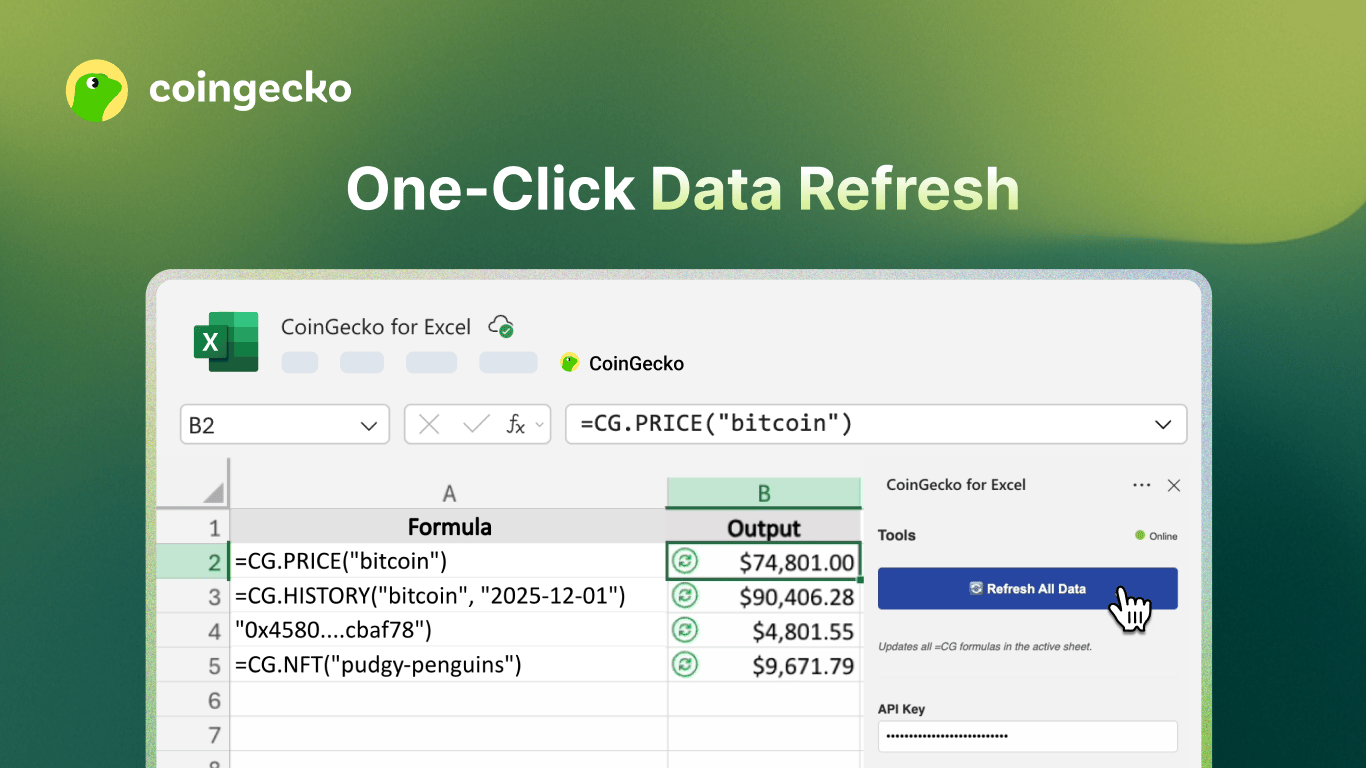 * **Refresh All Data** — clears the cache and forces all `=CG.*` formulas to recalculate with fresh API data.
* **Save** — saves your API key and plan selection, validates the key, and clears the cache.
***
## FAQ
Ensure the add-in is installed and loaded. The `CG` namespace is only available when the add-in is active.
Use the [full ID list](https://docs.google.com/spreadsheets/d/1wTTuxXt8n9q7C4NDXqQpI3wpKu1_5bGVmP9Xz0XGSyU/edit?gid=0#gid=0), or find the "API ID" on the coin's [CoinGecko](https://www.coingecko.com) page.
Open the taskpane, re-enter your API key, and click **Save**.
You've exceeded the API rate limit. Wait a moment, then click **Refresh All Data**.
Confirm the date is in `YYYY-MM-DD` format and that the coin existed on that date.
Make sure the cells below and to the right are empty so the array can spill.
View the full [privacy policy](/docs/excel/privacy-policy).
View the full [terms of use](/docs/excel/terms).
***
Have questions or feedback? Let us know.
* **Refresh All Data** — clears the cache and forces all `=CG.*` formulas to recalculate with fresh API data.
* **Save** — saves your API key and plan selection, validates the key, and clears the cache.
***
## FAQ
Ensure the add-in is installed and loaded. The `CG` namespace is only available when the add-in is active.
Use the [full ID list](https://docs.google.com/spreadsheets/d/1wTTuxXt8n9q7C4NDXqQpI3wpKu1_5bGVmP9Xz0XGSyU/edit?gid=0#gid=0), or find the "API ID" on the coin's [CoinGecko](https://www.coingecko.com) page.
Open the taskpane, re-enter your API key, and click **Save**.
You've exceeded the API rate limit. Wait a moment, then click **Refresh All Data**.
Confirm the date is in `YYYY-MM-DD` format and that the coin existed on that date.
Make sure the cells below and to the right are empty so the array can spill.
View the full [privacy policy](/docs/excel/privacy-policy).
View the full [terms of use](/docs/excel/terms).
***
Have questions or feedback? Let us know.