> ## Documentation Index
> Fetch the complete documentation index at: https://docs.coingecko.com/llms.txt
> Use this file to discover all available pages before exploring further.
# CoinGecko for Google Sheets
> Pull live prices, historical data, NFT floors, and onchain data into Google Sheets with the =COINGECKO() function
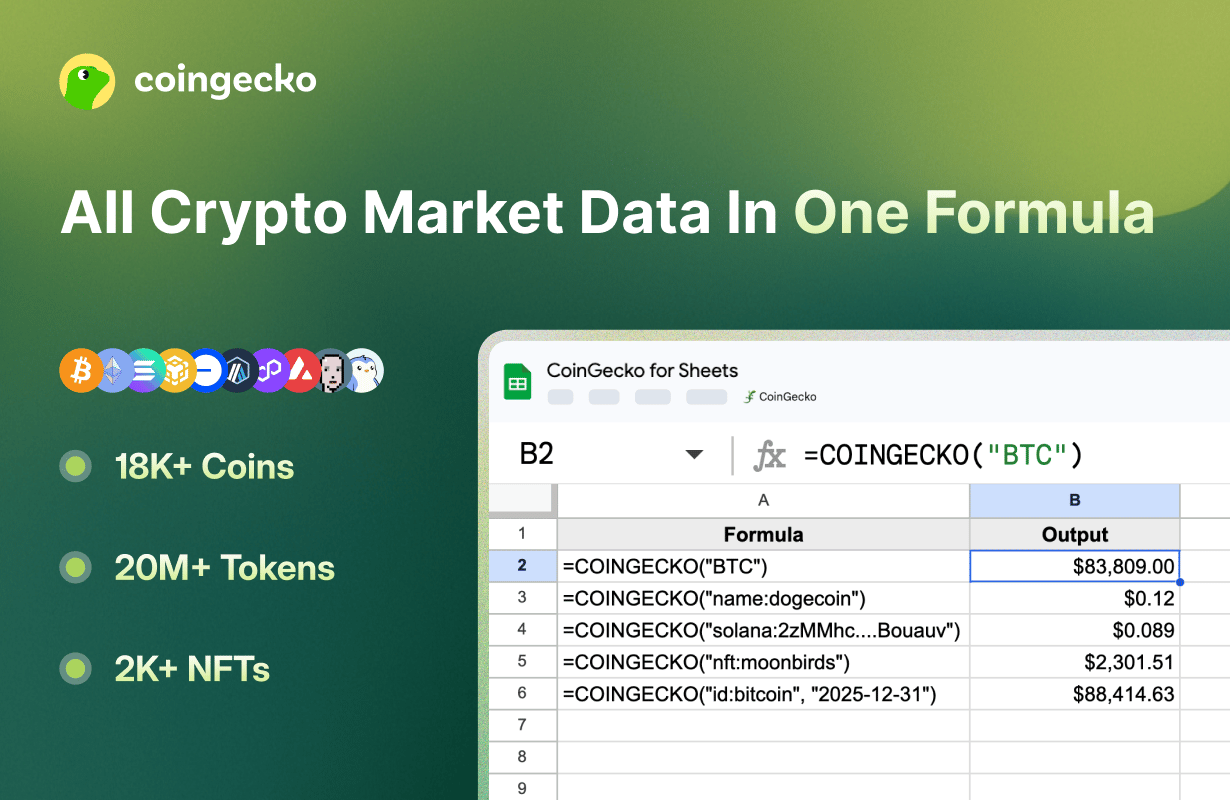 This official add-on follows the principle of least privilege — it only accesses the sheet you currently have open. It does **not** request access to Google Drive or other spreadsheets.
## Quick Start
Visit [CoinGecko for Sheets](https://workspace.google.com/marketplace/app/coingecko_for_sheets_live_crypto_prices/429190203358) on Google Workspace Marketplace and click **Install**.
Check **Select all** to grant the required permissions.
This official add-on follows the principle of least privilege — it only accesses the sheet you currently have open. It does **not** request access to Google Drive or other spreadsheets.
## Quick Start
Visit [CoinGecko for Sheets](https://workspace.google.com/marketplace/app/coingecko_for_sheets_live_crypto_prices/429190203358) on Google Workspace Marketplace and click **Install**.
Check **Select all** to grant the required permissions.
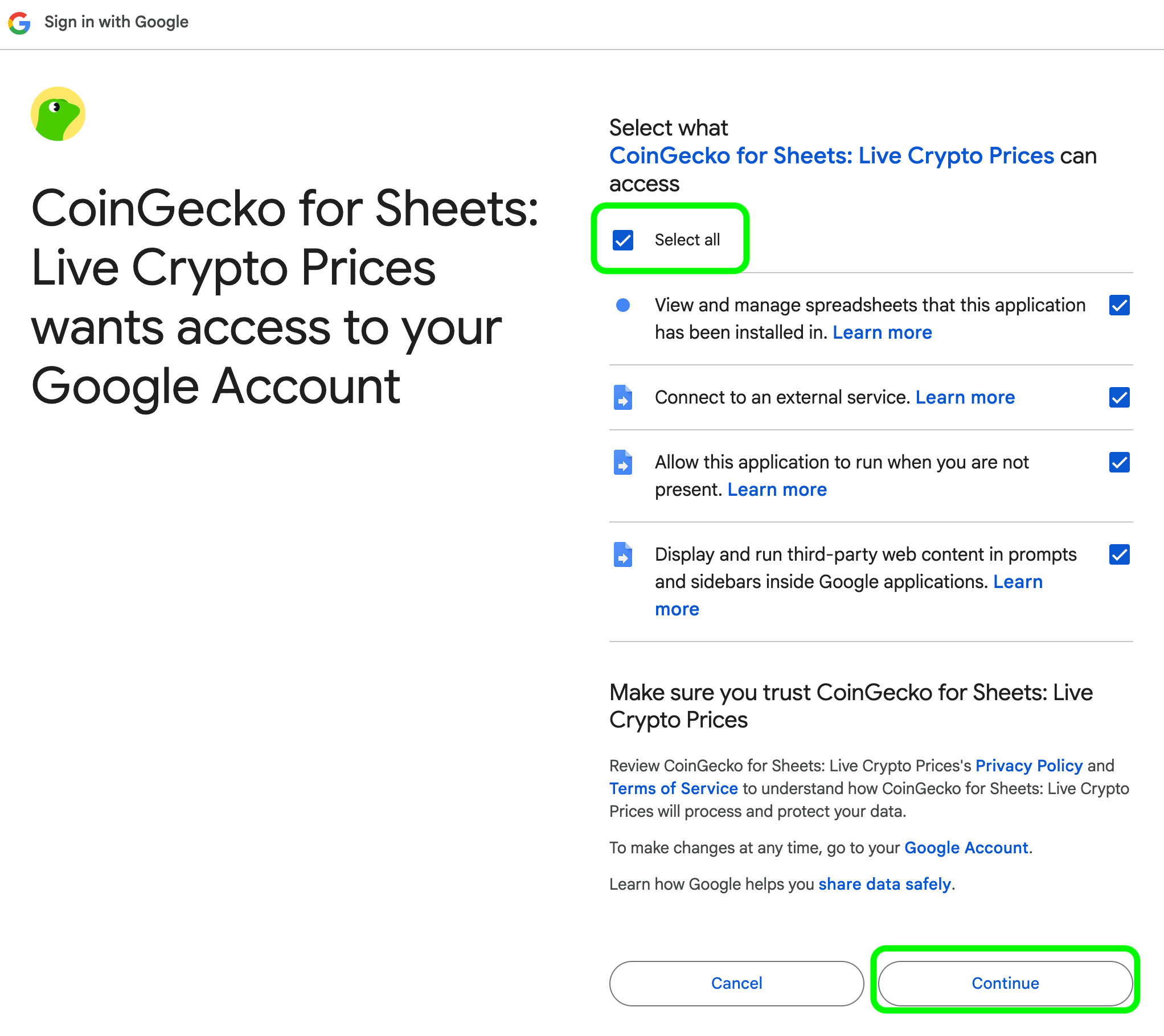 The add-on needs these permissions to communicate with the CoinGecko API and write data to your sheet. CoinGecko does **NOT** have access to your email or personal data.
Go to **Extensions** > **CoinGecko** > **Settings & API Key**.
The add-on needs these permissions to communicate with the CoinGecko API and write data to your sheet. CoinGecko does **NOT** have access to your email or personal data.
Go to **Extensions** > **CoinGecko** > **Settings & API Key**.
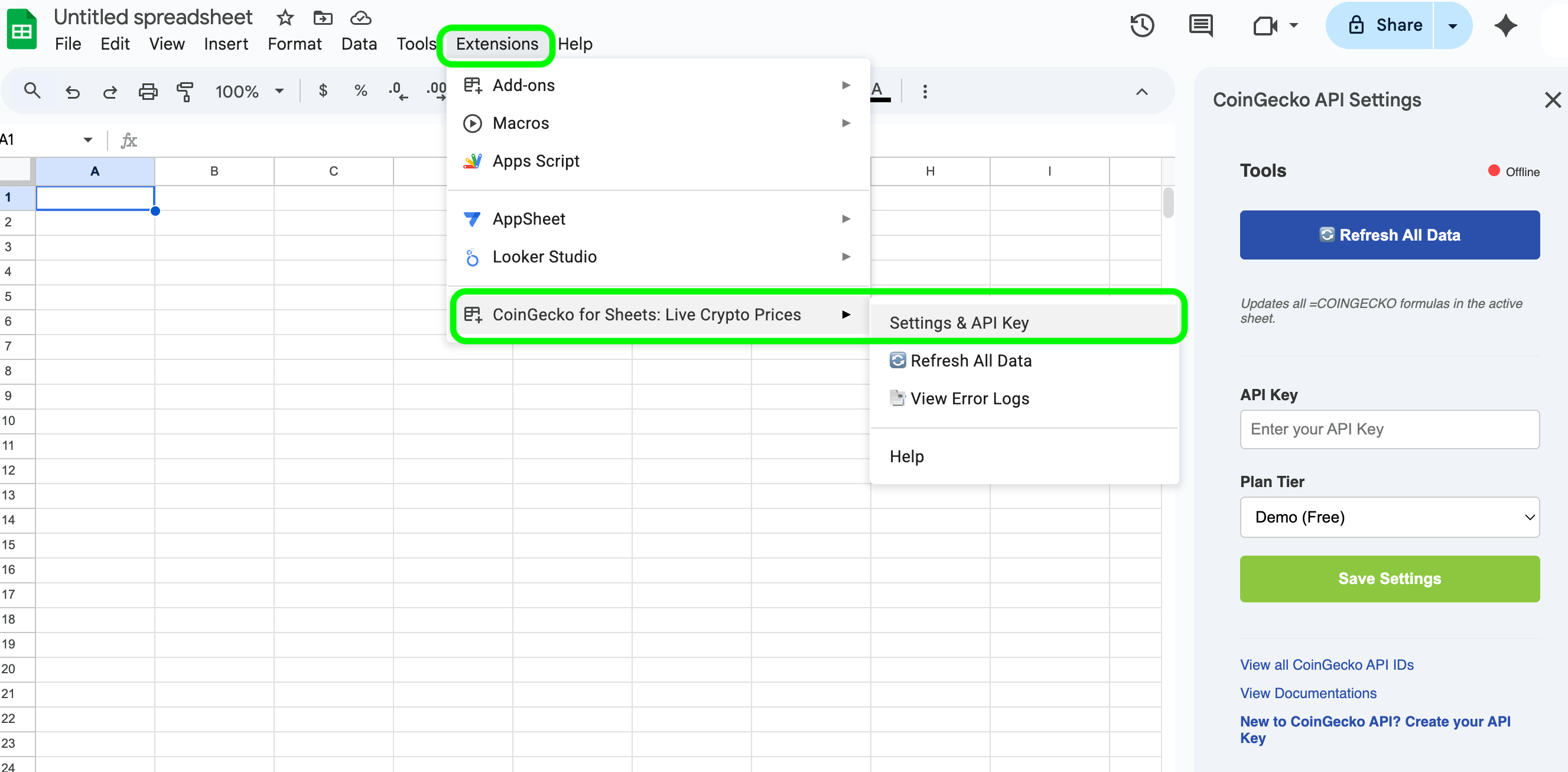 Enter your [CoinGecko API key](https://www.coingecko.com/en/api/pricing), select your plan (Demo or Pro), and click **Save Settings**.
## Using `=COINGECKO()`
A single "Smart Routing" function that auto-detects whether you're querying a ticker, coin ID, onchain token, or NFT.
### Latest Price
| Syntax | Description | Example |
| ------------------------------- | ----------------------------------------------------------------------------------------------------------------------------------------------------------------------------------- | ---------------------------------- |
| `=COINGECKO("SYMBOL")` | **Price by ticker symbol.**
Enter your [CoinGecko API key](https://www.coingecko.com/en/api/pricing), select your plan (Demo or Pro), and click **Save Settings**.
## Using `=COINGECKO()`
A single "Smart Routing" function that auto-detects whether you're querying a ticker, coin ID, onchain token, or NFT.
### Latest Price
| Syntax | Description | Example |
| ------------------------------- | ----------------------------------------------------------------------------------------------------------------------------------------------------------------------------------- | ---------------------------------- |
| `=COINGECKO("SYMBOL")` | **Price by ticker symbol.**
If multiple coins share the symbol, the largest by market cap is returned.
Falls back to GeckoTerminal if not found on CoinGecko. | `=COINGECKO("BTC")` |
| `=COINGECKO("name:NAME")` | **Price by coin name.**
Prioritizes CoinGecko-listed tokens. | `=COINGECKO("name:Ethereum")` |
| `=COINGECKO("id:COIN_ID")` | **Price by [coin ID](https://docs.google.com/spreadsheets/d/1wTTuxXt8n9q7C4NDXqQpI3wpKu1_5bGVmP9Xz0XGSyU/edit?gid=0#gid=0).**
Most reliable — avoids ticker conflicts. | `=COINGECKO("id:solana")` |
| `=COINGECKO("NETWORK:ADDRESS")` | **Onchain DEX price by [network ID](https://docs.google.com/spreadsheets/d/1wTTuxXt8n9q7C4NDXqQpI3wpKu1_5bGVmP9Xz0XGSyU/edit?gid=1120233236#gid=1120233236) and token address.** | `=COINGECKO("base:0x...")` |
| `=COINGECKO("nft:NFT_ID")` | **NFT floor price by [NFT ID](https://docs.google.com/spreadsheets/d/1wTTuxXt8n9q7C4NDXqQpI3wpKu1_5bGVmP9Xz0XGSyU/edit?gid=207968092#gid=207968092).** | `=COINGECKO("nft:pudgy-penguins")` |
Use the **Coin ID** (e.g. `id:bitcoin-cash` instead of `BCH`) for the most reliable results — symbols can be shared by multiple tokens.
### Historical Price
| Syntax | Description | Example |
| ---------------------------------------- | -------------------------------------------------------------------------------------------------------------------------------------------------------------------------------------------- | ---------------------------------------- |
| `=COINGECKO("id:COIN_ID", "YYYY-MM-DD")` | **Historical price at a specific date** (daily 00:00 UTC).
View [coin IDs](https://docs.google.com/spreadsheets/d/1wTTuxXt8n9q7C4NDXqQpI3wpKu1_5bGVmP9Xz0XGSyU/edit?gid=0#gid=0). | `=COINGECKO("id:bitcoin", "2025-12-31")` |
### Top Market Cap Rankings
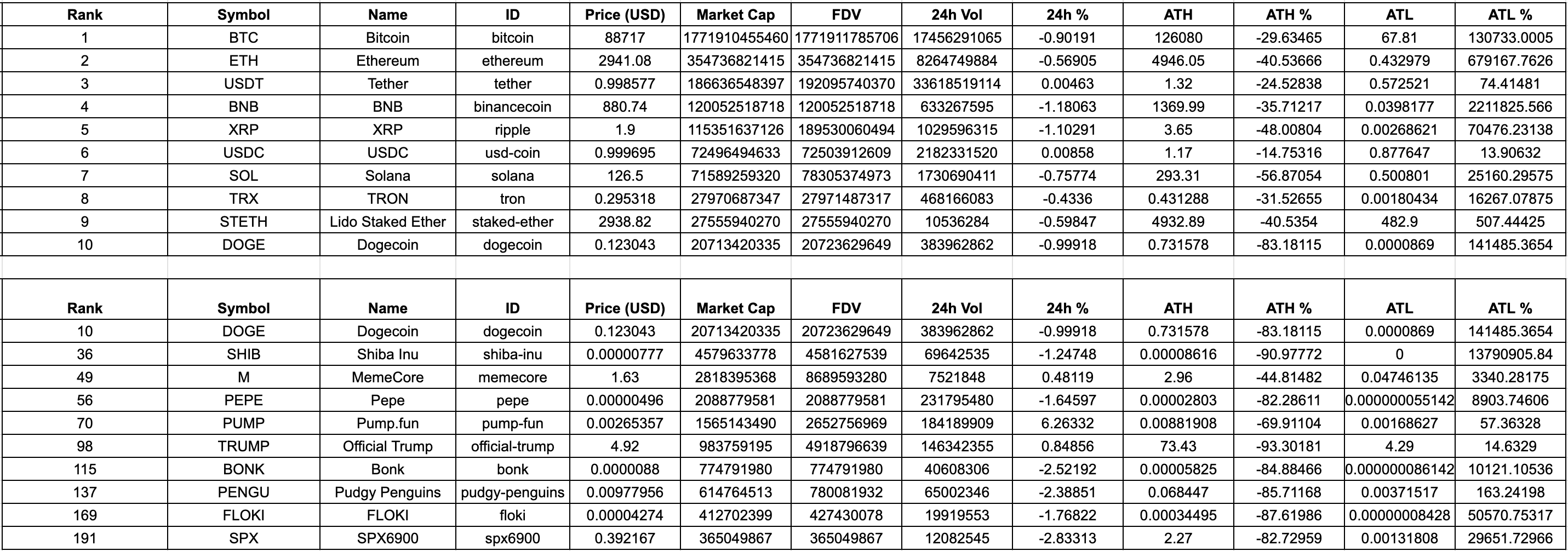
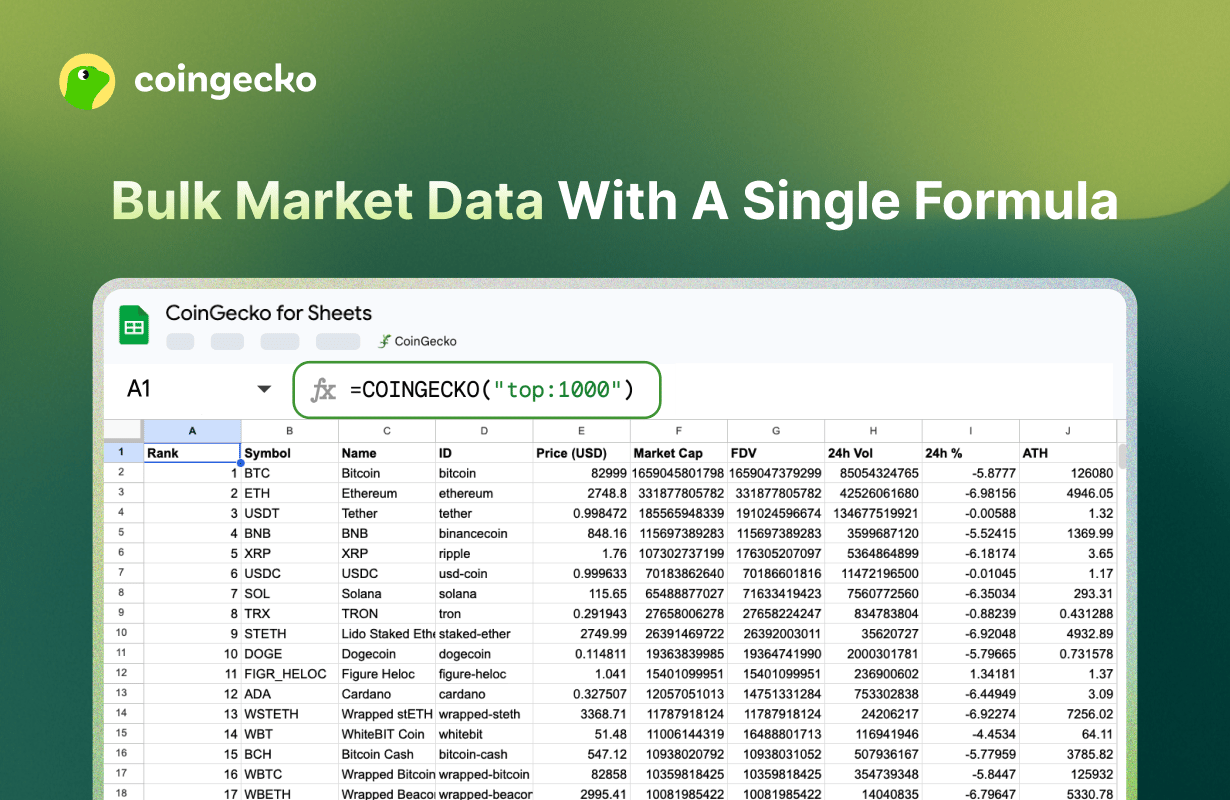 Get up to 1,000 tokens with a single formula:
| Syntax | Description | Example |
| --------------------------------- | -------------------------------------------------------------------------------------------------------------------------------------------------------------------- | --------------------------------- |
| `=COINGECKO("top:N")` | **Top N coins by market cap.** | `=COINGECKO("top:100")` |
| `=COINGECKO("top:N:CATEGORY_ID")` | **Top N coins by market cap in a [category](https://docs.google.com/spreadsheets/d/1wTTuxXt8n9q7C4NDXqQpI3wpKu1_5bGVmP9Xz0XGSyU/edit?gid=214581757#gid=214581757).** | `=COINGECKO("top:10:meme-token")` |
Get up to 1,000 tokens with a single formula:
| Syntax | Description | Example |
| --------------------------------- | -------------------------------------------------------------------------------------------------------------------------------------------------------------------- | --------------------------------- |
| `=COINGECKO("top:N")` | **Top N coins by market cap.** | `=COINGECKO("top:100")` |
| `=COINGECKO("top:N:CATEGORY_ID")` | **Top N coins by market cap in a [category](https://docs.google.com/spreadsheets/d/1wTTuxXt8n9q7C4NDXqQpI3wpKu1_5bGVmP9Xz0XGSyU/edit?gid=214581757#gid=214581757).** | `=COINGECKO("top:10:meme-token")` |
 ***
## Other Features
***
## Other Features
 ### Bulk Refresh
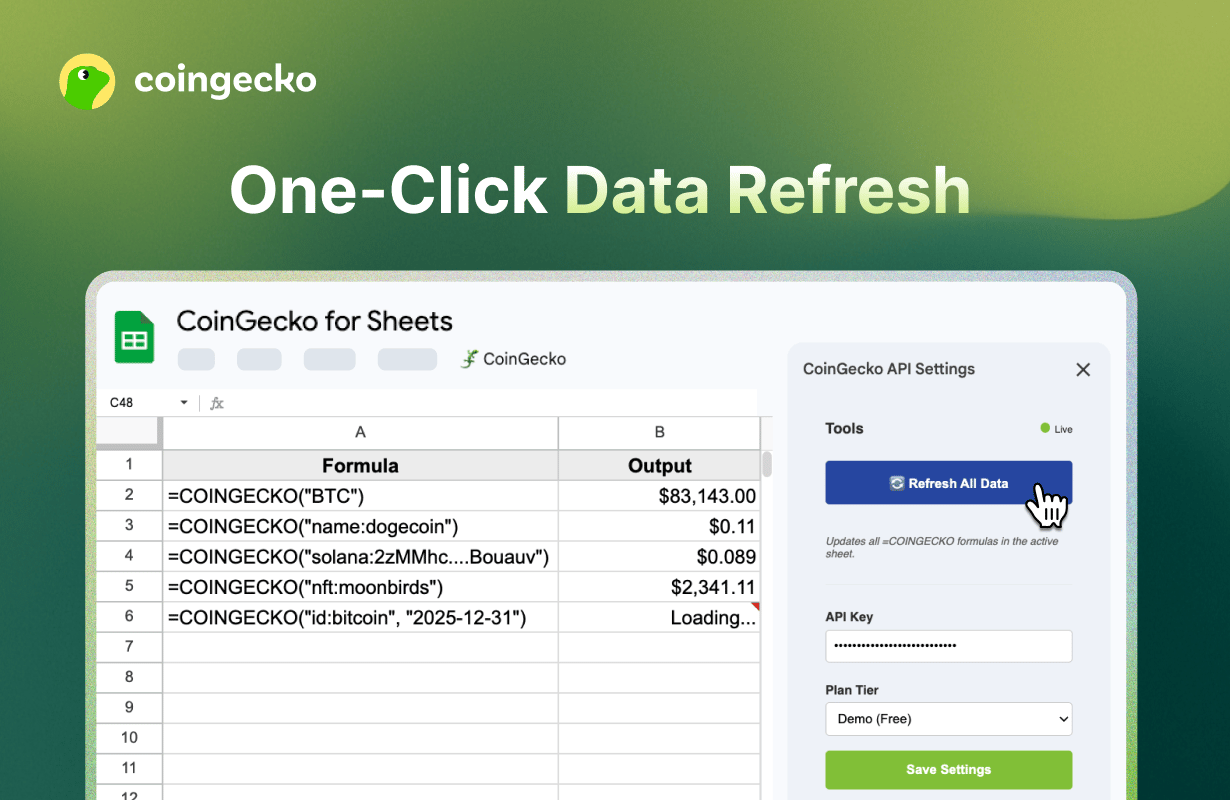
Google Sheets caches formulas for 1–2 hours. To force-update all `=COINGECKO` formulas:
### Bulk Refresh
Google Sheets caches formulas for 1–2 hours. To force-update all `=COINGECKO` formulas:
Open the CoinGecko Sidebar and click **Refresh All Data**.
### Error Debugging
Go to **Extensions** > **CoinGecko** > **View Error Logs**:
Opens a log sheet with exact API error responses (e.g. `429: Rate Limit Exceeded`, `403: Invalid API Key`).
***
## FAQ
Ensure the add-on is installed and "CoinGecko" appears under the Extensions menu. If it's missing, refresh your browser.
Use the [full ID list](https://docs.google.com/spreadsheets/d/1wTTuxXt8n9q7C4NDXqQpI3wpKu1_5bGVmP9Xz0XGSyU/edit?gid=0#gid=0), or find the "API ID" on the coin's [CoinGecko](https://www.coingecko.com) or [GeckoTerminal](https://www.geckoterminal.com) page.
Yes. Your key is stored using Google's PropertiesService — encrypted and unique to your Google account. CoinGecko does not see or store your key.
* **View and manage spreadsheets** — to populate cells with data and create error log sheets.
* **Connect to an external service** — to fetch prices from the CoinGecko API.
* **Run when you are not present** — to keep formulas active without the sidebar open.
* **Display third-party web content** — to render the sidebar UI.
We recommend checking **Select all** during authorization. Unchecking any permission may cause errors.
View the full [privacy policy](/docs/google-sheet-privacy-policy).
***
Have questions or feedback? Let us know.