> ## Documentation Index
> Fetch the complete documentation index at: https://docs.coingecko.com/llms.txt
> Use this file to discover all available pages before exploring further.
# TypeScript SDK
> Official CoinGecko TypeScript SDK — install, authenticate, and start querying
Full type safety and auto-complete — catch errors at compile time, not runtime.
# CoinGecko TypeScript SDK — AI Prompt Rules
## Install
```
npm install @coingecko/coingecko-typescript
```
## Client Setup
```typescript theme={null}
import Coingecko from '@coingecko/coingecko-typescript';
const client = new Coingecko({
proAPIKey: process.env['YOUR_API_KEY'],
environment: 'pro', // or 'demo' with demoAPIKey
maxRetries: 2,
});
```
* Load API keys from environment variables. Never hardcode.
* Initialize one reusable client instance.
## Finding Methods
Methods map to endpoint paths using camelCase, but names are **not always predictable**
— path parameters like `{address}` may become part of the method name
(e.g. `getAddress()`, `getAddresses()`, `getNetwork()`, `getID()`).
**Before using any SDK method, you MUST verify the exact method name.** Do not guess.
1. **Check the reference page first** — every endpoint page includes an SDK Examples section
at the bottom with copy-ready code:
* URL pattern: `https://docs.coingecko.com/reference/{operationId}`
* Look for the `#### SDK Examples` block and use the TypeScript snippet exactly as shown.
2. **Full method list** — if you need to search across all methods:
`https://docs.coingecko.com/docs/sdk-typescript-methods`
3. **Parameter details and endpoint caveats**:
`https://docs.coingecko.com/reference/{operationId}`
## Error Handling
Catch specific SDK exceptions — never use bare `catch (e)` without checking the type.
```typescript theme={null}
import Coingecko from '@coingecko/coingecko-typescript';
try {
const response = await client.simple.price.get({ vs_currencies: 'usd', ids: 'bitcoin' });
} catch (err) {
if (err instanceof Coingecko.RateLimitError) {
// Back off — 429 received
} else if (err instanceof Coingecko.NotFoundError) {
// Invalid coin ID or endpoint
} else if (err instanceof Coingecko.APIError) {
console.log(err.status, err.headers);
} else {
throw err;
}
}
```
## Rules
* ALWAYS use `@coingecko/coingecko-typescript`. Never use raw `fetch`/`axios`/`node-fetch`.
* Rely on the SDK's built-in retry (`maxRetries`). Never write manual retry loops.
* Use SDK types for params and responses: `Coingecko.Simple.PriceGetParams`, `Coingecko.Simple.PriceGetResponse`.
* Use the second argument for per-request overrides: `client.simple.price.get(params, { maxRetries: 5 })`.
Or set up manually:
```bash npm theme={null}
npm install @coingecko/coingecko-typescript
```
```bash bun theme={null}
bun add @coingecko/coingecko-typescript
```
View on [npm](https://www.npmjs.com/package/@coingecko/coingecko-typescript) | [GitHub](https://github.com/coingecko/coingecko-typescript)
```typescript Pro API theme={null}
import Coingecko from '@coingecko/coingecko-typescript';
const client = new Coingecko({
proAPIKey: 'YOUR_API_KEY',
environment: 'pro',
});
```
```typescript Demo API theme={null}
import Coingecko from '@coingecko/coingecko-typescript';
const client = new Coingecko({
demoAPIKey: 'YOUR_API_KEY',
environment: 'demo',
});
```
> Replace `YOUR_API_KEY` with your key from the [Developer Dashboard](https://www.coingecko.com/en/developers/dashboard#api-keys).
```typescript theme={null}
async function main() {
const response = await client.simple.price.get({
vs_currencies: 'usd',
ids: 'bitcoin',
});
console.log(JSON.stringify(response, null, 2));
}
main()
```
SDK methods map to endpoint paths. For example, `/simple/price` becomes `client.simple.price.get()`. Two ways to find the right method:
1. Every endpoint page includes an **SDK Examples** section at the bottom with copy-ready code. For example, see the [Coin Price by IDs](/reference/simple-price#sdk-examples) page:
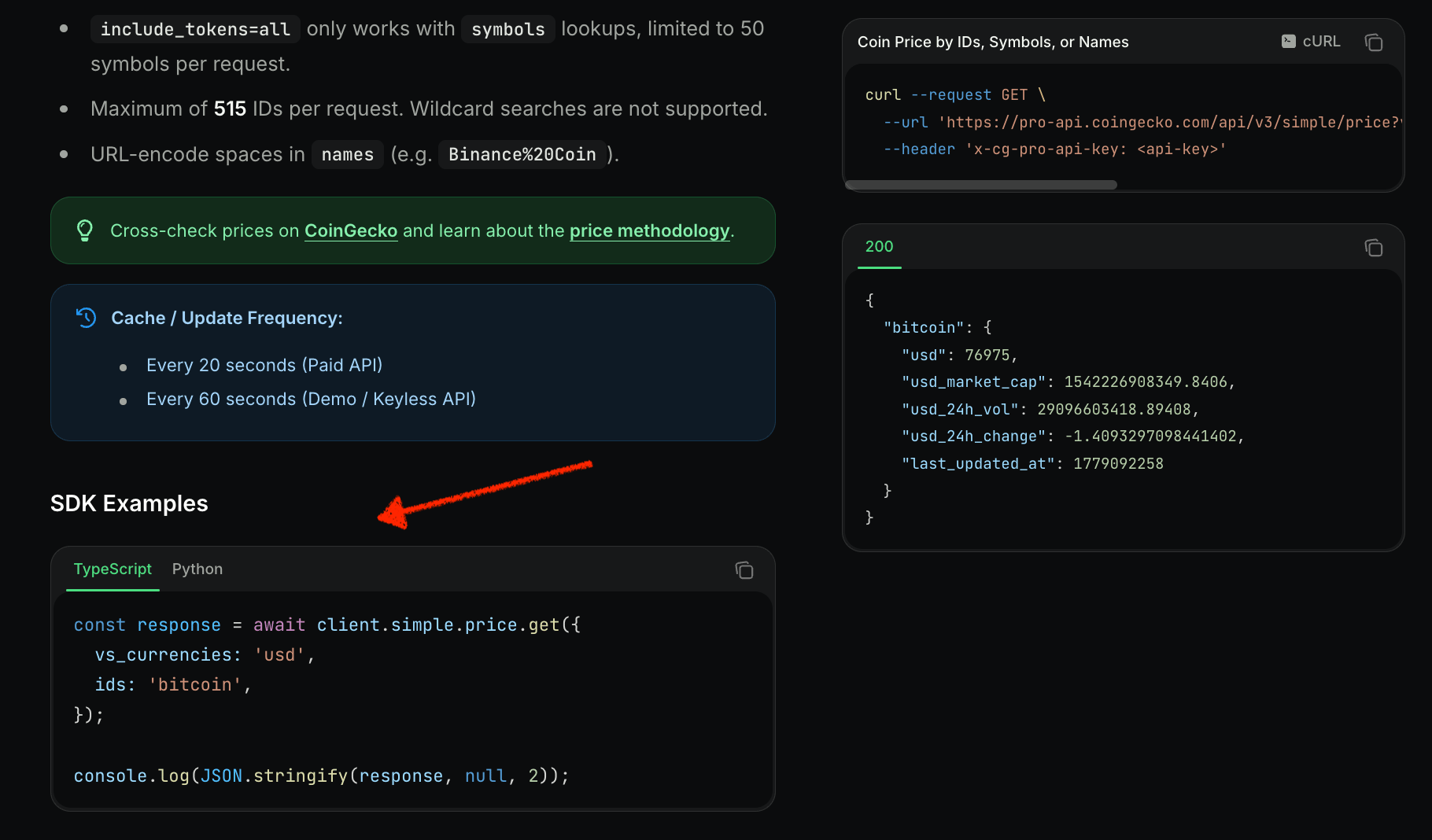 2. Visit **[all methods](/docs/sdk-typescript-methods)** to browse the full list with endpoint mappings.
***
Found a bug or missing feature? [Open an issue](https://github.com/coingecko/coingecko-typescript/issues).
2. Visit **[all methods](/docs/sdk-typescript-methods)** to browse the full list with endpoint mappings.
***
Found a bug or missing feature? [Open an issue](https://github.com/coingecko/coingecko-typescript/issues).