Documentation Index
Fetch the complete documentation index at: https://docs.coingecko.com/llms.txt
Use this file to discover all available pages before exploring further.
Why Use Webhooks?
By listening to the events likecg.coin.info.updated , you can keep your application’s database synchronized with CoinGecko in real-time, eliminating the need for cron jobs or constant API polling.
Potential Use Cases
Automated Asset Updates for Wallets & Exchanges
Instantly update your platform’s UI when a token undergoes a rebrand, changes its ticker symbol, is assigned a new
category, or updates its official logo (image updates).Cross-Chain Contract Monitoring
Automatically detect when an existing project deploys on a new blockchain, or when a token migrates to a new smart contract address (
platforms additions/removals).Risk Management & Compliance
Act immediately when CoinGecko adds critical alerts to a coin, such as a warning about a malicious activity or contract address migration notice (
public_notices).1. Getting Started
It currently supports 1 event type:cg.coin.info.updated , it will listen to changes across all active coins on CoinGecko.
Setup Your Webhook
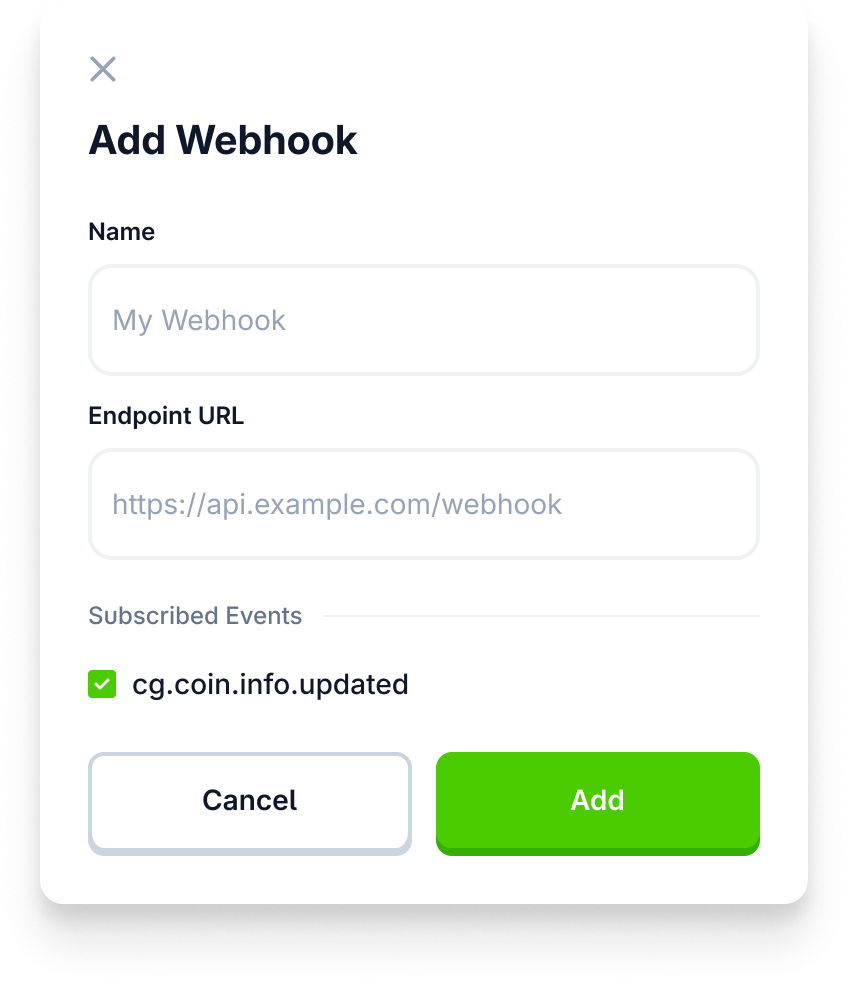
Create a webhook via Developer Dashboard UI.

Done!
You will now receive notification events to your server, whenever there’s a relevant info update for coins listed on CoinGecko.com . Refer to sections below for payload example and more details.
2. Event Types
| Event Type | Details |
|---|---|
| cg.coin.info.updated | This event is triggered whenever there is an update to the core information of a coin |
| (more coming soon!) | Please share your use cases & suggestions via this survey form. |
3. HTTP Headers
When CoinGecko sends a Webhook event to your configured endpoint, the request will include the following standard and custom HTTP headers:POST /your-endpoint-urlHost: your-server.comContent-Type: application/jsonx-cg-timestamp:1776066...(UNIX timestamp of when the event occurred. Useful for replay attack prevention)x-cg-signature:7e7f6...(Cryptographic signature to verify the payload is genuinely from CoinGecko)x-cg-event-id:123...(Unique identifier for the webhook event)
4. Security & Signature Verification
To ensure that the webhook events your server receives are genuinely originating from CoinGecko and have not been tampered with, you should verify the cryptographic signature included in the request headers.The Signing Secret
When you create a new webhook in the Developer Dashboard, CoinGecko automatically generates a unique Signing Secret (a private key starting withwhsec_).
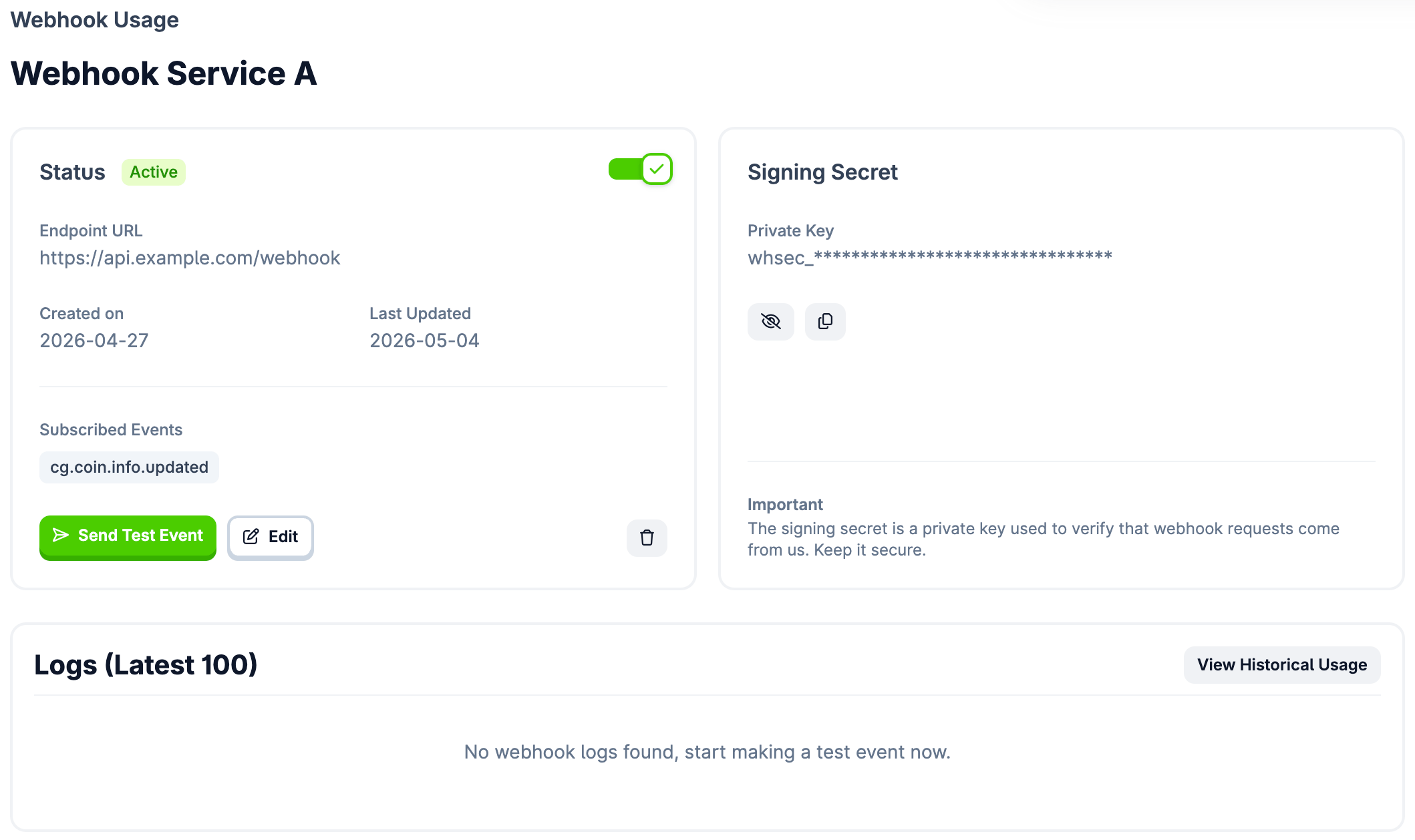
- Location: You can view, reveal, and copy your Signing Secret on the Webhook Details page in your dashboard.
- Important: Treat this signing secret like a password. Do not share it, commit it to public repositories, or expose it in client-side code. It must be kept securely on your backend server.
Verifying the Payload (Code Examples)
Every webhook request we send will include signature headers (includingx-cg-signature, x-cg-timestamp, and x-cg-event-id). To verify the request, you must construct a specific “signing string” and compute an HMAC SHA256 hash using your Signing Secret to compare against the signature header.
The signing string format is: {timestamp}:{event_id}:{json_body}
Important: The {json_body} portion of your string must be the raw, unparsed request body (exactly as it was received). If your server framework (like Express) automatically parses the JSON into an object before you verify it, the re-stringified payload might differ slightly, causing the signature verification to fail.
5. Managing and Debugging Webhooks
The Developer Dashboard provides built-in tools to help you build and troubleshoot your webhook integrations. Navigate to your Webhook Details page to access the following features:Send Test Event
Before going live, you can use the Send Test Event button. This will immediately dispatch a mockcg.coin.info.updated payload to your configured Endpoint URL. This is the best way to verify that your server is properly receiving POST requests and returning a successful 2xx HTTP status code without waiting for a real market event to occur.
Delivery Logs
The dashboard displays a Logs table showing your latest 100 webhook delivery attempts. Use these logs to quickly identify if your endpoint is rejecting our requests, which could lead to your webhook being automatically disabled after too many retries.6. Billing and Credits
Webhooks consume your monthly API credits.- Charge: Credits are deducted for each payload we deliver based on your plan’s credit charge per event (default is 10 credits per event). You are not charged API credits for retry attempts.
- Hardcapping (Overage Disabled): If you run out of credits and have “Overage” disabled (Hardcap enabled) in your Developer Dashboard:
- We will immediately stop delivering webhook events.
- All active Webhooks will be auto-disabled.
- You will receive an email notification indicating that delivery has stopped.
- Note: When credits are replenished (or overage is re-enabled), you must manually re-activate your webhooks in the Developer Dashboard. We do not automatically turn them back on.
Estimating Your Webhook Costs
Each delivered webhook payload consumes 10 API credits. Thecg.coin.info.updated webhook currently listens to all active coins on CoinGecko, the number of events triggered will fluctuate based on broader market activity and how frequently projects update their metadata.
To help you forecast your usage, here is our current baseline:
- Expected Volume: Based on historical data, our data averages up to 200 updates per day.
- Estimated Monthly Cost: This translates up to 6,000 events per month, consuming approximately 60,000 API credits.
- Plan Recommendation: This estimated volume fits comfortably within the monthly credit allowance of the Analyst Plan and higher tiers.
Best Practice: The 24-Hour Baseline Test
If you are concerned about unpredictable credit consumption, we highly recommend running a short test before committing to a long-term integration:- Enable Hardcap: Ensure your “Overage” setting is turned OFF in your Developer Dashboard. This guarantees you will not be charged unexpected overage fees if the volume spikes.
- Run for 24-48 Hours: Activate your webhook and let it run for a full day or two.
- Check Your Logs: Review your credit consumption in the dashboard to establish a reliable baseline based on current market conditions.
7. Retries and Failed Attempts
If your server fails to respond with a2xx success code, CoinGecko will attempt to resend the payload. You are not charged API credits for retry attempts. Only the initial webhook delivery attempt costs a credit.
Retry Mechanism
We implement an exponential backoff strategy for failed deliveries:- Single Event Backoff: If a specific event delivery fails, we will retry up to 14 times across approximately 24 hours. If the 14th retry fails, we will completely disable the specific Webhook. You will receive an email notification that the webhook endpoint has been disabled.
- Webhook Disablement (Hard Cap): If your endpoint is continuously unresponsive and experiences 300 failed retries across 12 hours, we will completely disable the specific Webhook. You will receive an email notification that the webhook endpoint has been disabled.