Documentation Index

Fetch the complete documentation index at: https://docs.coingecko.com/llms.txt

Use this file to discover all available pages before exploring further.

CoinGecko MCP Server is currently in Beta. We’re constantly improving, and your feedback is crucial. Please share any thoughts or suggestions via this feedback form.

Overview

The official CoinGecko MCP Server makes live crypto data available to your AI models and applications. With 76+ tools covering 1M+ assets across 200+ networks, you can empower your agents to:
  • Access real-time market data: Get aggregated prices, market cap, and trading volume for 15k+ coins on CoinGecko, integrated across 1,000+ exchanges.
  • Dive into onchain analytics: Query onchain DEX price and liquidity data for more than 8M tokens across 200+ networks via GeckoTerminal.
  • Discover market trends: Instantly find trending coins, new token listings, top gainers/losers, and popular NFT collections.
  • Retrieve rich metadata: Pull essential details like project descriptions, logos, social links, contract addresses, security info, and more.
  • Analyze historical performance: Access historical price, market data, and OHLCV for any cryptocurrency.
  • Explore crypto categories: Effortlessly list coins within specific sectors like Meme, DeFi, Layer 1, AI agent, and more.
👉 See the full list of MCP tools available to your AI agents.

Choose Your Server

Server TypeBest ForEndpointsStatus
Remote (Public, Keyless)First-time users, quick tests, and basic queries. Connect instantly without registration. Subject to shared rate limits.Primary: /mcp
Fallback: /sse
Public Beta
Remote (Authenticated)Scalable apps and AI agent integrations. Unlocks 76+ tools under your Demo/Pro plan with higher, reliable rate limits. Get your API key here.Primary: /mcp
Fallback: /sse
Public Beta
Local ServerLocal development and desktop AI apps. Build and test even without an active internet connection. Requires a Demo or Pro API key. Get your API key here.Local instanceBeta

Server URLs and Transports

Each remote server supports two transports. Streamable HTTP is the primary transport recommended for all modern MCP clients.
ServerStreamable HTTP (recommended)SSE (fallback)
Publichttps://mcp.api.coingecko.com/mcphttps://mcp.api.coingecko.com/sse
Prohttps://mcp.pro-api.coingecko.com/mcphttps://mcp.pro-api.coingecko.com/sse
Most modern MCP clients support Streamable HTTP natively. Use the SSE fallback only if your client does not support it or you experience connection issues.

Quick Start

Prerequisites

Remote Server (Public)

The easiest way to get started — no API key required. Add the following to your client’s MCP config file.
The config file name and location depend on your client. Find yours at modelcontextprotocol.io/quickstart.
{
  "mcpServers": {
    "coingecko_mcp": {
      "url": "https://mcp.api.coingecko.com/mcp"
    }
  }
}
Here’s a quick 2-minute tutorial for setting up the public server with Claude Desktop:

Remote Server (Authenticated)

To access more tools and higher rate limits, use your CoinGecko API key with our hosted BYOK server. Get your API key here. Step 1: Add the configuration
{
  "mcpServers": {
    "coingecko_mcp": {
      "url": "https://mcp.pro-api.coingecko.com/mcp"
    }
  }
}
Step 2: Authorize your MCP access After adding the config, the first time your client connects to the CoinGecko MCP, a browser tab will open redirecting you to our authentication page:
  • Paste in your CoinGecko API key and authorize to link your key to the MCP session. ✨ Don’t have an API key yet? Upgrade to Pro today — read more here.
  • You can also toggle between dynamic/static tools here. Learn more in Advanced Configuration.

Local Server

For local development and maximum control, run the MCP server directly on your machine.
{
  "mcpServers": {
    "coingecko_mcp_local": {
      "command": "npx",
      "args": [
        "-y",
        "@coingecko/coingecko-mcp"
      ],
      "env": {
        "COINGECKO_PRO_API_KEY": "YOUR_PRO_API_KEY",
        "COINGECKO_ENVIRONMENT": "pro"
      }
    }
  }
}
✨ Don’t have an API key yet? Get your free Demo key or upgrade to Pro — read more here.

Supported Clients

CoinGecko MCP works with any MCP-compatible client. The following have been tested:
ClientNative URL SupportSetup Guide
Claude.aiYesSee below
Claude CodeYesSetup guide
CursorYesSetup guide
VS Code (Copilot)Yes
OpenAI CodexVia mcp-remoteSetup guide
Gemini CLIYes
KiroYesSetup guide
ChatGPTYesSee below
WarpYes
ZedYes
AmpYes
OpenCodeYes
Don’t see your client? Any MCP-compatible client that supports remote servers should work. Use the native URL config or the mcp-remote bridge from Quick Start above.

For Claude Free Users (via Claude Desktop)

You must use the Claude Desktop app and modify the configuration file.
  1. Locate claude_desktop_config.json: Follow the instructions here to find the file on your system.
  2. Add a server config: Copy and paste one of the server configs from Quick Start above.
  3. Restart Claude Desktop: Close and reopen the app for the changes to take effect.

For Claude Pro Users

You can also follow the same steps as Free users by modifying the claude_desktop_config.json file.
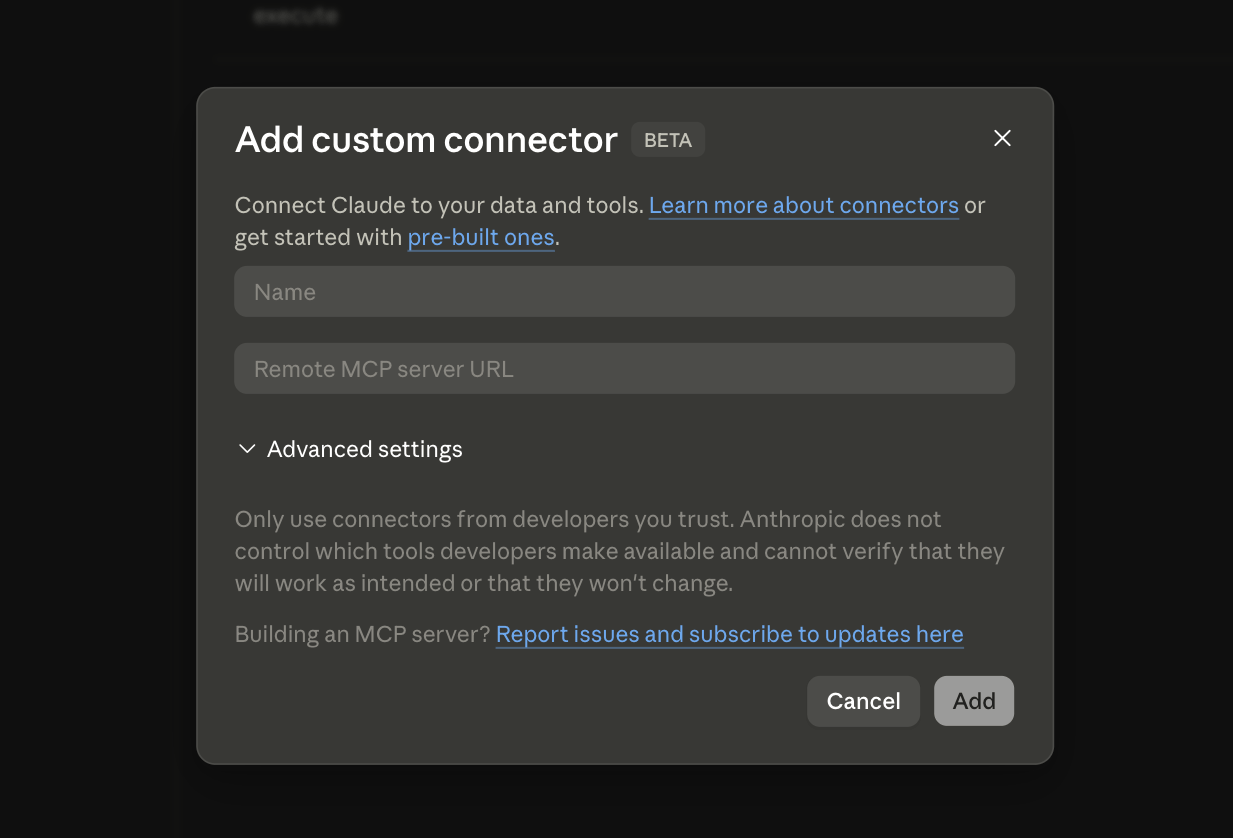
  1. In Claude (claude.ai or the Desktop app), click on ‘Add connectors’ in your chat.
  2. Click on ‘Add custom connector’.
  3. Enter the remote MCP server URL:
    • Keyless access: https://mcp.api.coingecko.com/mcp
    • Authenticated access (BYOK): https://mcp.pro-api.coingecko.com/mcp
  4. Click ‘Add’, and you’re ready to go!
OpenAI ChatGPT requires developer mode to be enabled.
  1. Open your profile > Connectors > Advanced Settings > Toggle Developer Mode on.
  2. In the Connectors modal, choose Create and enter the CoinGecko MCP server info.
  3. Before prompting, choose + > More > Developer Mode > enable the CoinGecko MCP tool.

API Plans and Rate Limits

The Public server uses shared rate limits across all users — suitable for development, testing, and light usage. For production or high-volume applications, use the Authenticated or Local server with your own API key.
FeatureDemo (Guide here)Pro
Rate Limit30 calls/minStarts at 500 calls/min
Monthly Credits10,000Starts at 500,000
Historical DataPast 1 yearFrom 2013 until now
MCP ToolsLimited accessFull access, including exclusive tools:
- Top Gainers & Losers
- NFTs Collection Historical Chart
- 🔥 Megafilter for Pools
- Pools by Category ID
🔥 Ready to upgrade? Explore our API plans.

Advanced Configuration

Dynamic vs. Static Tools

When running the CoinGecko MCP server, you can choose how your LLM client discovers tools:
  • Static (Default): The AI receives a complete list of tools and their functions upfront. Faster for specific, known tasks.
  • Dynamic: The AI first queries the server for available tools based on a keyword search, then learns how to use them. More flexible but can be slower.
For a deeper dive, read the official documentation from Stainless.

Using llms.txt

To help AI models interact with CoinGecko data effectively, we provide an llms.txt file at /llms-full.txt. This gives models context on how to best query our API, ensuring more accurate and efficient data retrieval. We recommend utilizing this in your integrations.

Troubleshooting

Restart your MCP client completely — simply refreshing the page or starting a new conversation is not enough. The client must fully reload to discover the new server and its tools.Also verify:
  • The config file is saved and is valid JSON.
  • The server name (coingecko_mcp) does not conflict with an existing server entry.
  • Check your internet connection and verify the endpoint URL is reachable.
  • If you’re on a corporate network, your firewall may be blocking the endpoint. Ask IT to whitelist mcp.api.coingecko.com (or mcp.pro-api.coingecko.com).
  • Try switching to the SSE fallback endpoint — e.g., https://mcp.api.coingecko.com/sse.
  • Verify Node.js is installed: run node --version and npm --version.
  • Test mcp-remote directly: npx mcp-remote --version.
  • If you see permission errors, clear the npm cache: npm cache clean --force.
  • Consider switching to the native "url" config — no npx required — if your client supports it.
  • Ensure your client supports browser-based OAuth. Not all MCP clients do.
  • Try restarting the client — the OAuth window opens on the first connection attempt after adding the config.
  • Check that your system has a default browser configured.
  • Ask your AI client to list available tools to confirm the server is connected and tools are loaded.
  • Use natural language queries rather than function-call syntax.
  • Start with simple queries (e.g., “What is the price of Bitcoin?”) before complex ones.
  • Confirm you are using the correct server tier — some tools require a Pro API key.
PlatformLog location
Claude Desktop (macOS)~/Library/Logs/Claude/mcp*.log
Claude Desktop (Windows)%LOCALAPPDATA%\Claude\Logs\
Claude Desktop (Linux)~/.local/share/Claude/logs/
For other MCP clients, check their documentation for log file locations.

Example Prompts

Tap into the full potential of CoinGecko data — use these prompts to kickstart your next AI build.

Simple Queries

  • What is the current price of Bitcoin in USD?
  • What is the market cap of Ethereum?
  • What are the top 3 trending coins on CoinGecko right now?
  • What are the top AI coins on GeckoTerminal now?
  • What is the floor price of the Pudgy Penguins NFT collection?

Advanced Queries

  • Show me the current top 10 cryptocurrencies by market cap. Include their price, 24h change, and total volume. Display this in an interactive table.
  • Generate a 30-day price chart for Ethereum (ETH) against USD, showing both price and trading volume.

Creative and Fun Ideas

  • Create a quiz to tell me which cryptocurrency I am based on my personality. Try it here: claude.ai/public/artifacts
  • Build a Wordle-style game where the answer is a crypto asset’s name or symbol, like ‘BITCOIN’ or ‘SHIBA’. Try it here: claude.ai/public/artifacts

CoinGecko MCP Server is powered by Stainless Have feedback, a cool idea, or need help? Reach out to eason.lim@coingecko[dot]com or fill in this feedback form.